 Packetbrew
IP Addressing Explained
Learn how computers find each other on the internet using IP addresses, address classes, and the revolutionary IPv6 protocol
Introduction: The Digital Postal System
Have you ever wondered how your computer knows exactly where to send that email, load that website, or stream that video? The answer lies in something called an IP address - essentially, a postal address for every device connected to the internet.
Just as your home needs a unique street address so the mail carrier can deliver your packages, every computer, smartphone, tablet, and smart device needs its own IP address so data knows exactly where to go. In this comprehensive guide, we’ll break down everything you need to know about IP addressing in a way that’s simple to understand, even if you’re brand new to networking.
What is an IP Address?
An IP address (Internet Protocol address) is a unique numerical label assigned to each device on a network. In its most common form (IPv4), it looks like this:
192.168.1.5
This address consists of four numbers separated by dots, where each number can range from 0 to 255. Think of it like coordinates on a map - these numbers help data packets navigate the vast network of the internet to reach their intended destination.
The Two-Part Structure
Every IP address has two important components:
- Network Portion - Identifies which network the device belongs to (like a street name)
- Host Portion - Identifies the specific device within that network (like a house number)
This two-part structure is what makes efficient routing possible across the global internet.
Understanding IP Address Classes
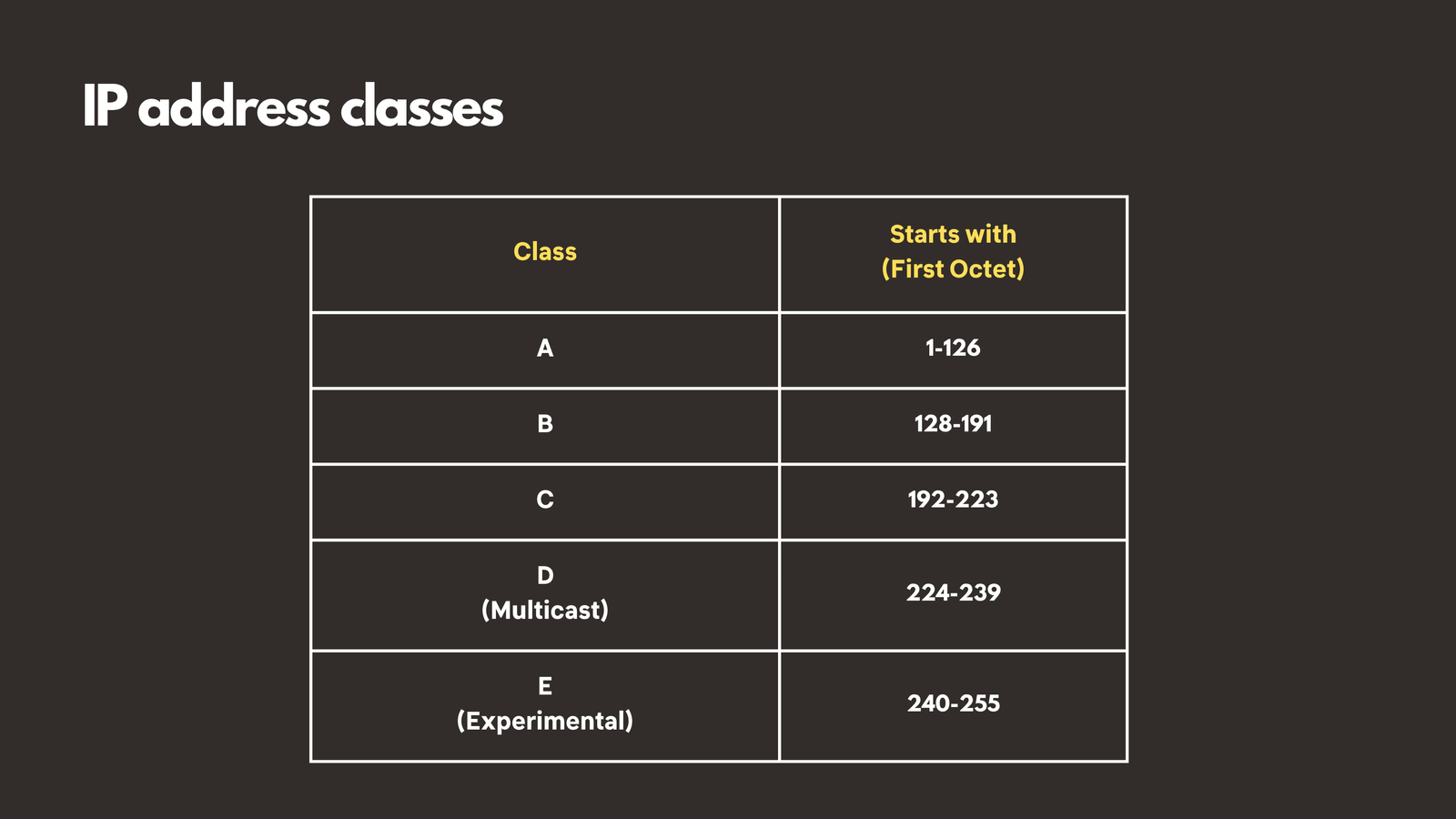
In the early days of the internet, engineers developed a system called “classful addressing” to organize IP addresses efficiently. They created different classes of networks designed for organizations of different sizes. Let’s explore each class:
Class A: Networks for Giants
Range: 1.0.0.0 to 126.255.255.255
Class A networks were designed for massive organizations that needed to connect millions of devices. These addresses start with a number between 1 and 126 in the first octet.
Capacity: Over 16 million host addresses per network
Best For:
- Large corporations
- Major internet service providers
- Government organizations
Example: 10.0.0.0 is a commonly used Class A private network
In a Class A network, only the first 8 bits identify the network, while the remaining 24 bits are available for host addresses - hence the enormous capacity.
Class B: Medium-Sized Organizations
Range: 128.0.0.0 to 191.255.255.255
Class B addresses start with numbers between 128 and 191, and they strike a balance between network quantity and host capacity.
Capacity: Approximately 65,000 host addresses per network
Best For:
- Universities and colleges
- Large businesses
- Regional internet service providers
- Hospital networks
Example: 172.16.0.0 is a popular Class B private network range
Class B networks use the first 16 bits for the network portion and the last 16 bits for host addresses.
Class C: Small Networks
Range: 192.0.0.0 to 223.255.255.255
Class C is the most common class you’ll encounter in everyday networking, especially in home and small business environments.
Capacity: 254 host addresses per network
Best For:
- Home networks
- Small businesses
- Department-level networks
- Small office setups
Example: 192.168.1.0 - This should look familiar! It’s the default network for most home routers.
In Class C networks, the first 24 bits identify the network, leaving only 8 bits (254 usable addresses) for hosts.
Classes D and E: Special Purpose
Class D (224.0.0.0 to 239.255.255.255): Reserved for multicast groups, where data is sent to multiple recipients simultaneously.
Class E (240.0.0.0 to 255.255.255.255): Reserved for experimental purposes and future use.
Special IP Addresses You Should Know
The Loopback Address: 127.0.0.0 to 127.255.255.255
The most famous address in this range is 127.0.0.1, commonly called “localhost.” This special address allows your computer to communicate with itself - like looking in a mirror and having a conversation.
Common Uses:
- Testing network applications locally
- Web development and software testing
- Troubleshooting network services
- Running local servers
When you type localhost or 127.0.0.1 in your browser, you’re asking your computer to connect to a service running on itself, not reaching out to the internet.
Public vs Private IP Addresses: Understanding the Difference
One of the most important concepts in networking is the distinction between public and private IP addresses.
Public IP Addresses: Your Internet Identity
Think of public IP addresses as famous landmarks - addresses that everyone on the internet can find and reach.
Characteristics:
- Globally unique and routable on the internet
- Assigned by your Internet Service Provider (ISP)
- Visible to websites and services you connect to
- Required for hosting public-facing services
Your home router has one public IP address that represents your entire household to the outside internet. When you visit a website, the site sees your public IP address, not the individual addresses of your devices.
Private IP Addresses: Your Internal Network
Private IP addresses are like room numbers inside your house - only meaningful within your local network.
Private IP Address Ranges:
| Class | Private IP Range |
|---|---|
| Class A | 10.0.0.0 to 10.255.255.255 |
| Class B | 172.16.0.0 to 172.31.255.255 |
| Class C | 192.168.0.0 to 192.168.255.255 |
Key Benefits:
- Can be reused in different networks (your 192.168.1.5 and your neighbor’s 192.168.1.5 don’t conflict)
- Provides an extra layer of security (not directly accessible from the internet)
- Conserves public IP addresses
- Allows multiple devices to share one public IP through NAT (Network Address Translation)
Real-World Example:
In your home network:
- Router’s public IP: 203.0.113.42 (visible to the internet)
- Mom’s laptop: 192.168.1.5 (private, internal only)
- Dad’s phone: 192.168.1.6 (private, internal only)
- Your tablet: 192.168.1.7 (private, internal only)
All three devices share the single public IP when accessing the internet, but maintain separate private addresses for local communication.
IPv6: The Future of IP Addressing
The Address Exhaustion Problem
IPv4, with its 32-bit address structure, can theoretically provide about 4.3 billion unique addresses. While that sounds like a lot, consider this:
- World population: Nearly 8 billion people
- Multiple devices per person (phone, laptop, tablet, smartwatch, IoT devices)
- Billions of servers, routers, and other network infrastructure
We’ve essentially run out of new IPv4 addresses!
Enter IPv6: Unlimited Possibilities
IPv6 (Internet Protocol version 6) was developed to solve the address exhaustion crisis. An IPv6 address looks dramatically different from IPv4:
Example: 2001:0db8:85a3:0150:0124:8a2e:0370:7334
Key Differences Between IPv4 and IPv6
IPv4:
- 32-bit addresses
- Approximately 4.3 billion possible addresses
- Written in decimal (192.168.1.1)
- Four octets separated by periods
IPv6:
- 128-bit addresses
- Approximately 340 undecillion (340 trillion trillion trillion) addresses
- Written in hexadecimal (2001:0db8:85a3::8a2e:0370:7334)
- Eight groups of four hexadecimal digits separated by colons
How Many Addresses is That?
To put IPv6’s capacity in perspective:
- More addresses than there are grains of sand on all Earth’s beaches
- Enough addresses to assign billions of unique IPs to every person on Earth
- Sufficient addresses for every device your family will own for generations
- Room for the massive growth of IoT (Internet of Things) devices
IPv6 Advantages Beyond Capacity
- Simplified Address Assignment: Built-in auto-configuration
- Improved Routing: More efficient packet processing
- No Need for NAT: Every device can have a unique public address
The Transition Period
Currently, the internet runs on a dual-stack system - most networks and devices support both IPv4 and IPv6. This gradual transition ensures compatibility while the world moves toward full IPv6 adoption.
Practical Applications: Why This Matters
Understanding IP addresses isn’t just academic - it has real-world applications:
For IT Professionals
- Network Design: Planning address schemes for organizations
- Troubleshooting: Diagnosing connectivity issues
- Security: Implementing firewall rules and access controls
- Server Configuration: Setting up web servers, email servers, and databases
For Certification Exams
IP addressing is fundamental to:
- CompTIA Network+
- Cisco CCNA
- CompTIA Security+
- Microsoft networking certifications
For Everyday Users
- Home Network Setup: Configuring routers and devices
- Gaming: Setting up port forwarding for multiplayer games
- Smart Home: Managing IoT devices
- Privacy: Understanding what websites can see about your connection
Quick Reference Guide
How to Identify IP Address Classes
Look at the first number (first octet):
- 1-126: Class A
- 128-191: Class B
- 192-223: Class C
- 224-239: Class D (Multicast)
- 240-255: Class E (Experimental)
Common Private Network Examples
- Home networks: 192.168.1.0/24 or 192.168.0.0/24
- Office networks: 10.0.0.0/8 or 172.16.0.0/16
- Guest networks: Often separate private ranges like 192.168.2.0/24
Special Addresses Summary
- 127.0.0.1: Localhost (loopback)
- 0.0.0.0: Unspecified address
- 255.255.255.255: Broadcast address
- 169.254.x.x: APIPA (Automatic Private IP Addressing - assigned when DHCP fails)
Conclusion: You’re Now IP Address Savvy!
Congratulations! You’ve just learned fundamental concepts that many people find intimidating:
- What IP addresses are and how they work
- The different classes of IP addresses (A, B, C, D, E)
- How to identify address classes
- The difference between public and private addresses
- Private IP ranges for each class
- Special addresses like loopback
- IPv6 and why it’s the future of networking
This knowledge forms the foundation for more advanced networking concepts like subnetting, VLANs, routing protocols, and network security. Whether you’re pursuing an IT certification, setting up your home network, or just curious about how the internet works, you now have a solid grasp of one of networking’s most essential concepts.
Next Steps in Your Networking Journey
Ready to dive deeper? Consider exploring:
- Subnetting: Learn to divide networks into smaller, more efficient segments
- DHCP: Discover how devices automatically receive IP addresses
- DNS: Learn how domain names translate to IP addresses
- NAT and PAT: Understand how private addresses access the internet
Ready to dive deeper into IP Addressing? Check out the video on this link https://youtu.be/tyBFGfKQQ40