 Packetbrew
Network Security Essentials: Understanding ACLs, NAT/PAT, and VPNs
Introduction
In our previous discussion on subnetting, we explored how to divide large networks into smaller, more efficient segments. But organizing your network is only the first step. Once your network infrastructure is in place, you need robust mechanisms to control traffic flow, manage IP addresses efficiently, and establish secure connections for remote access and inter-office communications.
This guide covers three essential network security and management concepts that every network engineer must master: Access Control Lists (ACLs), Network Address Translation (NAT/PAT), and Virtual Private Networks (VPNs). Whether you’re preparing for your CCNA certification or looking to strengthen your networking fundamentals, this article will provide you with clear explanations and practical examples.
Access Control Lists (ACLs): Your Network’s Security Guards
What Are ACLs?
Access Control Lists (ACLs) function as the security guards of your network infrastructure. They are sets of rules applied to router or switch interfaces that determine which network traffic is allowed to pass through and which traffic should be blocked. Think of ACLs as a sophisticated bouncer at a club—they check every packet against a list of criteria and make split-second decisions about whether to allow entry.
How ACLs Filter Traffic
ACLs evaluate network traffic based on several criteria:
- Source IP Address - Where is the traffic coming from?
- Destination IP Address - Where is the traffic going?
- Protocol Type - Is it TCP, UDP, ICMP, or another protocol?
- Port Numbers - Which application or service is being accessed?
Types of ACLs
Network engineers work with two primary types of ACLs:
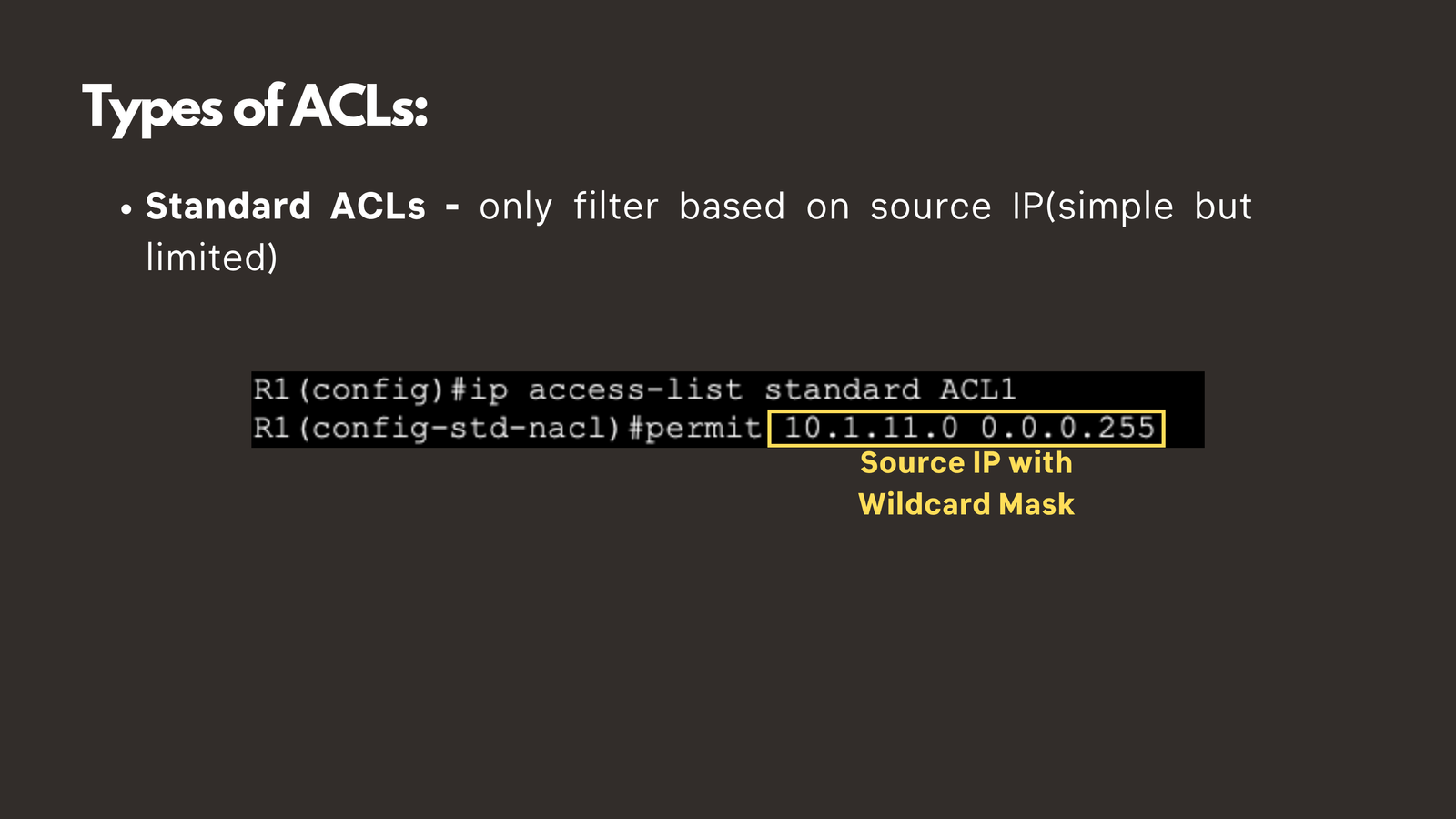
1. Standard ACLs
Standard ACLs are the simpler of the two options. They filter traffic based solely on the source IP address. While this simplicity makes them easy to configure, it also limits their flexibility. Standard ACLs are best suited for basic traffic filtering where you need to permit or deny traffic from specific networks or hosts without considering the destination or service being accessed.
2. Extended ACLs
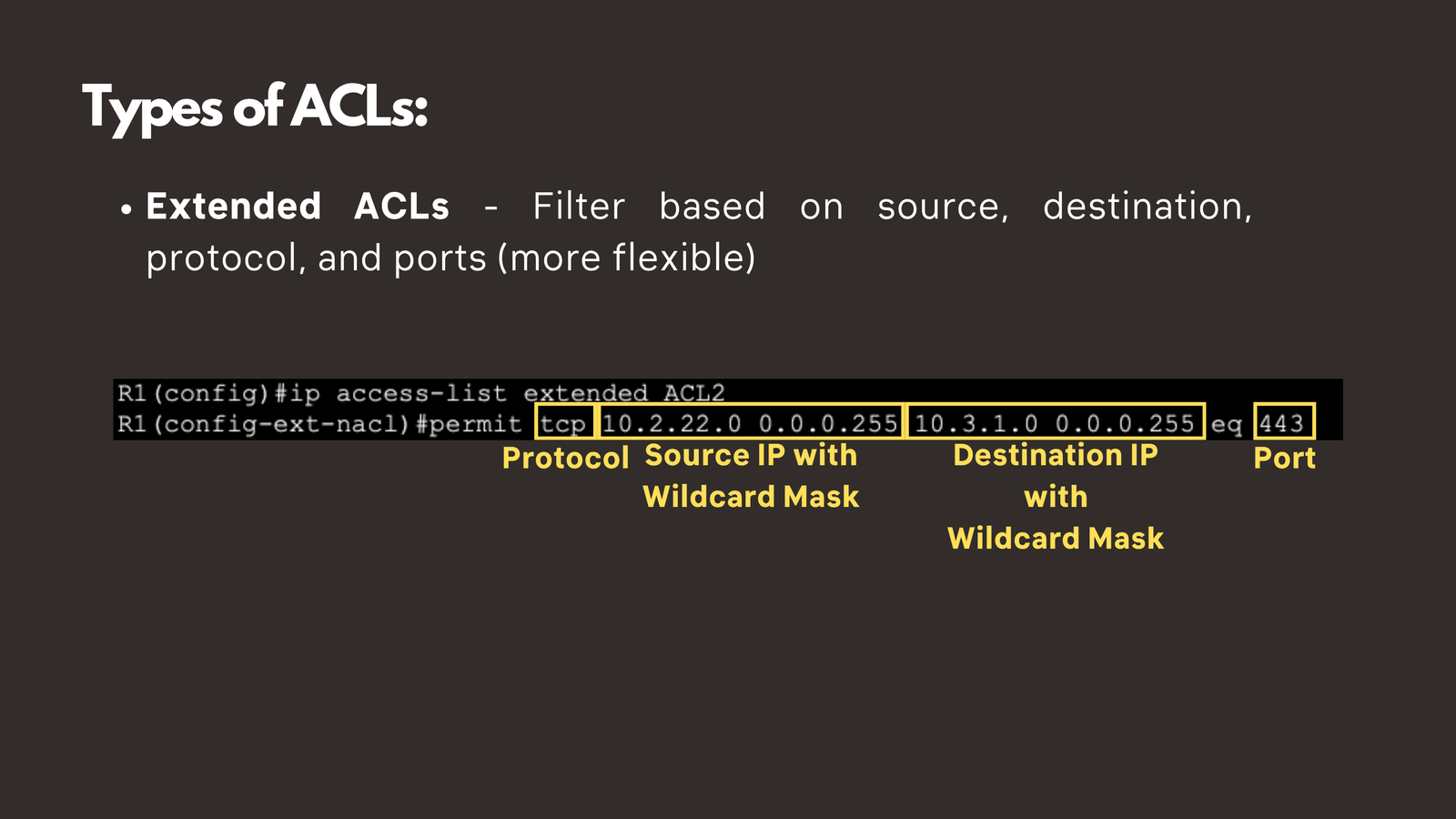
Extended ACLs offer significantly more granularity and control. They can filter based on source and destination IP addresses, protocol types, and port numbers. This flexibility makes extended ACLs the preferred choice for most enterprise network security implementations.
Practical Example
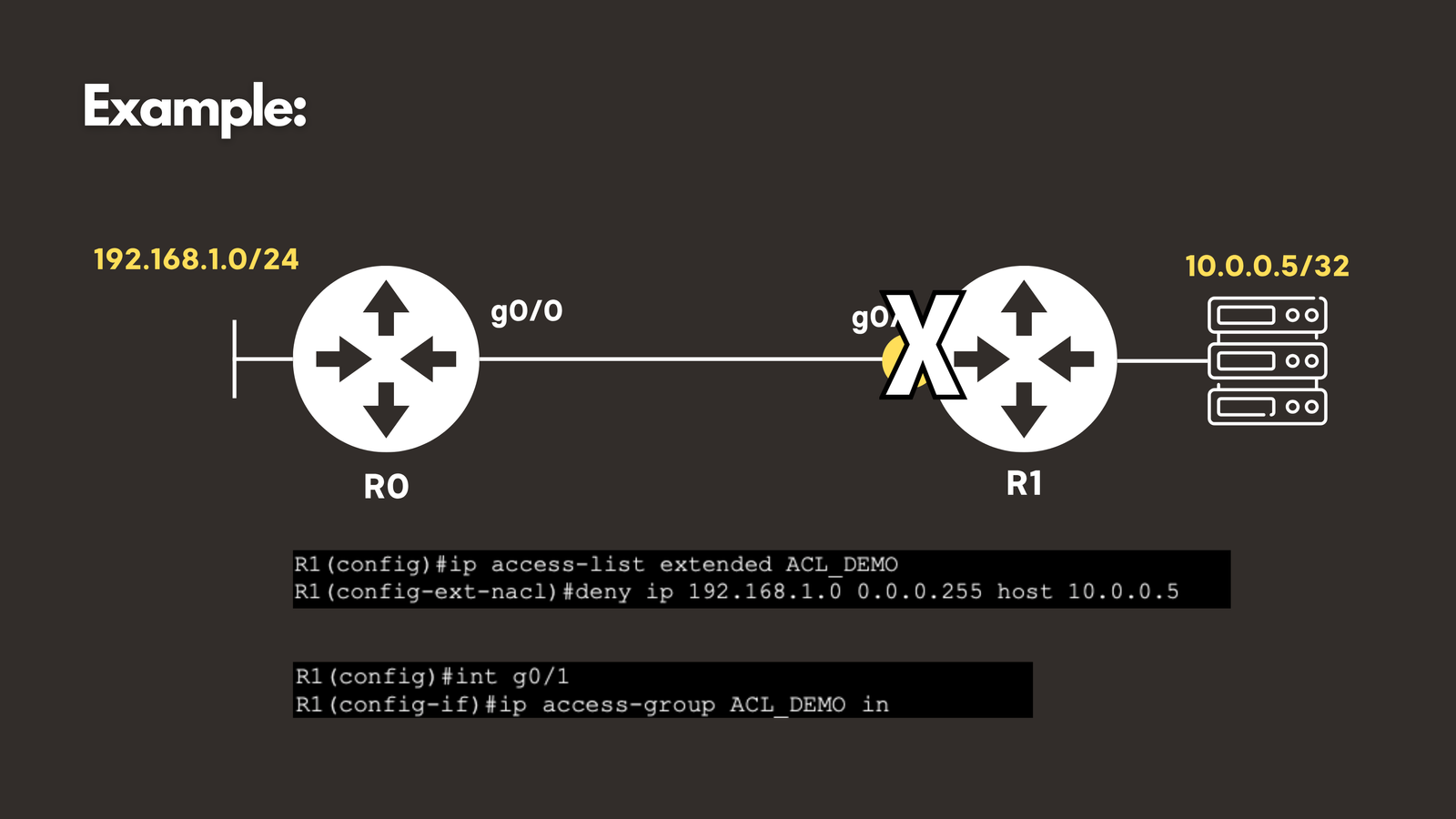
Let’s walk through a real-world scenario. Suppose you have a sensitive database server at IP address 10.0.0.5, and you want to prevent the entire 192.168.1.0/24 network from accessing it.
Here’s how you would accomplish this:
Step 1: Create an ACL rule that denies traffic from 192.168.1.0/24 to 10.0.0.5/32
Step 2: Apply this ACL to the appropriate router interface
Once configured, the router will automatically drop any packets matching this criteria, effectively blocking that entire network from reaching your database server.
Critical ACL Concepts to Remember
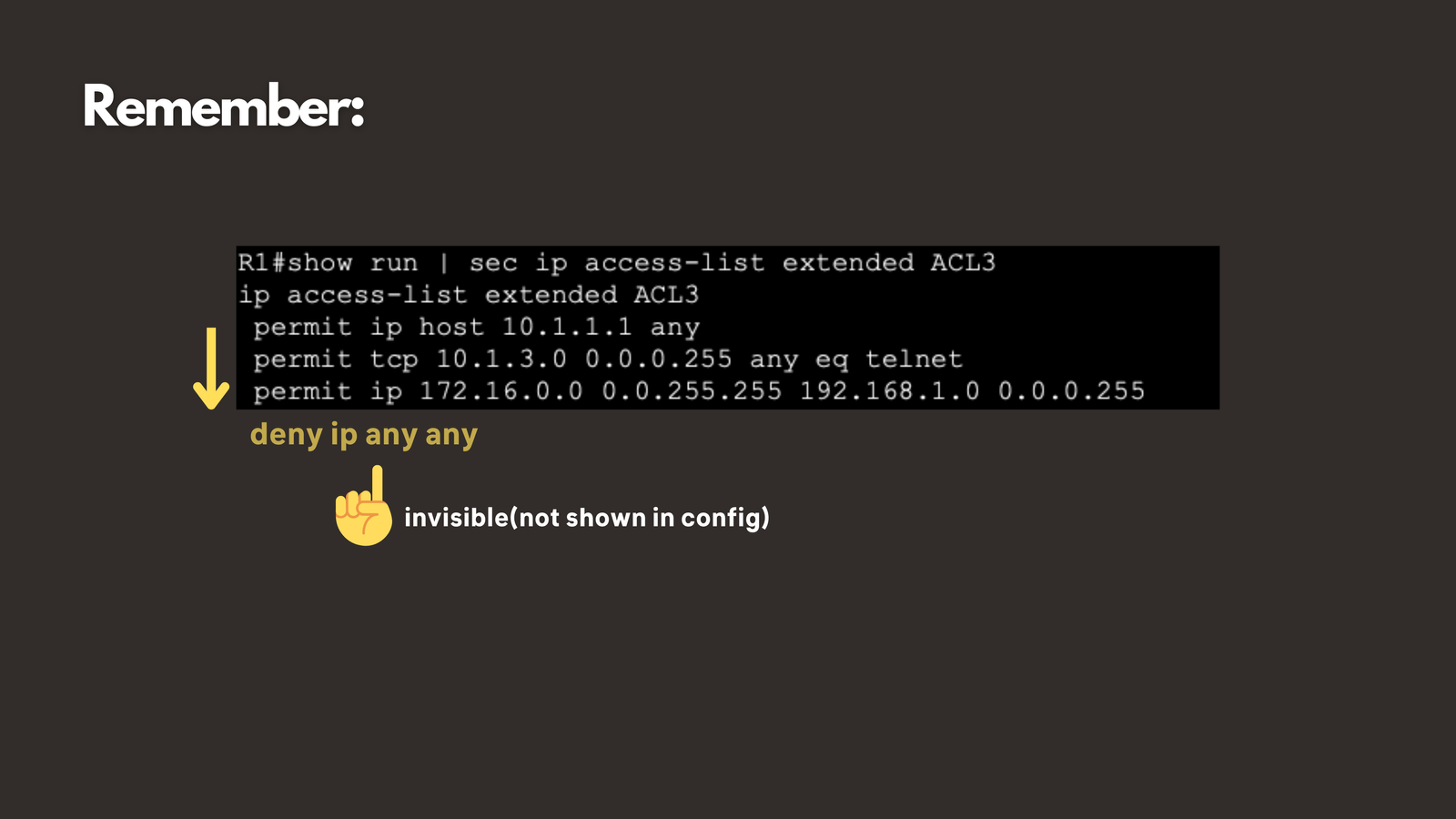
Processing Order Matters: ACLs process rules from top to bottom. Once a packet matches a rule, the router takes the specified action (permit or deny) and stops processing. This means rule order is crucial for ACL effectiveness.
The implicit Deny: Every ACL has an invisible “deny all” statement at the end. If traffic doesn’t match any explicit permit rule, it will be denied by default. This is why it’s essential to place your permit rules before your deny rules—otherwise, legitimate traffic might be blocked unintentionally.
NAT and PAT: The Address Translators
Understanding the IP Address Shortage Problem
The explosive growth of internet-connected devices has created a significant challenge: IPv4 address exhaustion. With only about 4.3 billion possible IPv4 addresses and billions of devices needing connectivity, we face a fundamental shortage. Network Address Translation (NAT) provides an elegant solution to this problem.
What Is NAT?
Network Address Translation (NAT) converts private IP addresses used within your internal network to public IP addresses that can communicate over the internet. This allows organizations to use private IP address ranges (like 192.168.1.0/24 or 10.0.0.0/8) internally while presenting only one or a few public IP addresses to the outside world.

The Three Types of NAT
1. Static NAT (One-to-One Mapping)
Static NAT creates a permanent, one-to-one mapping between a private IP address and a public IP address. This is ideal for servers that need to be consistently accessible from the internet, such as web servers, mail servers, or FTP servers.
Example: Your internal web server at 192.168.1.100 is always translated to public IP 203.0.113.10

2. Dynamic NAT (Pool-Based Translation)
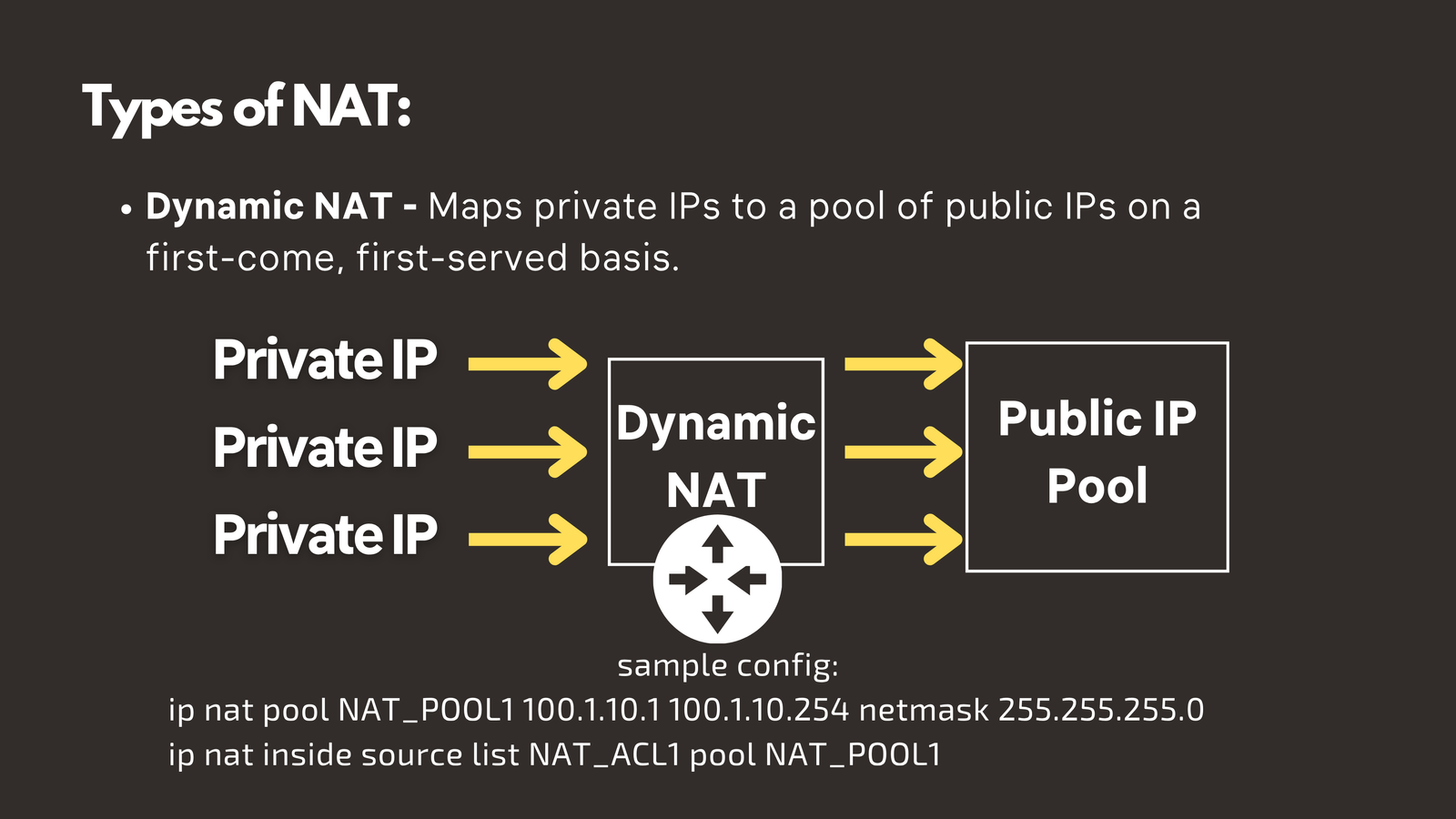
Dynamic NAT maps private IP addresses to a pool of available public IP addresses on a first-come, first-served basis. When an internal device needs internet access, the router assigns it an available public IP from the pool. Once the session ends, that public IP returns to the pool for use by other devices.
Limitation: You need as many public IPs in your pool as you have simultaneous connections—which can still be expensive and inefficient.
3. PAT - Port Address Translation (The Game-Changer)
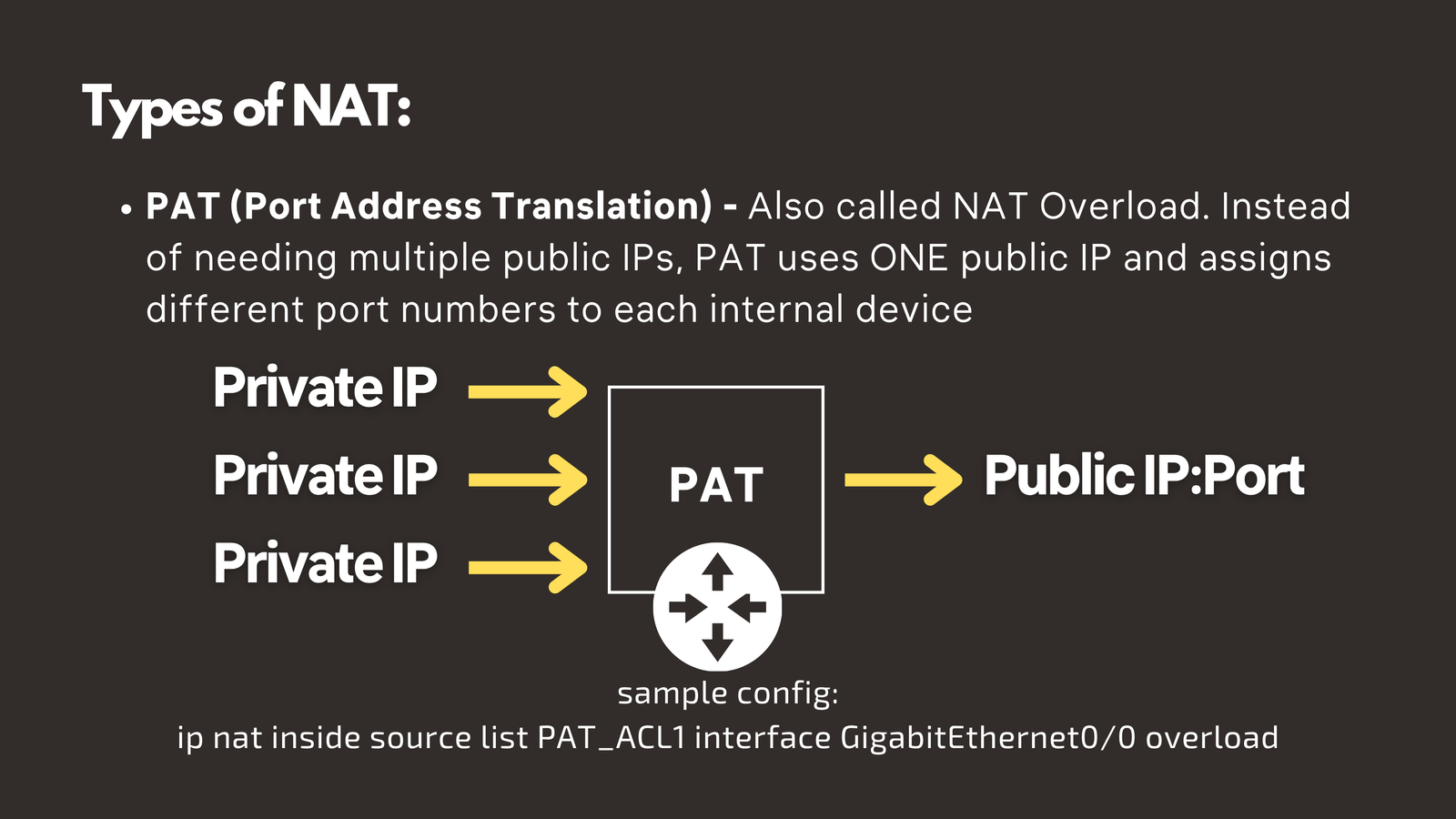
Port Address Translation (PAT), also called NAT Overload, is the most widely used form of NAT and the technology that makes your home network possible. PAT allows multiple devices to share a single public IP address by using different port numbers to distinguish between connections.
How PAT Works: A Detailed Example
Let’s examine how PAT enables multiple devices to share one public IP:
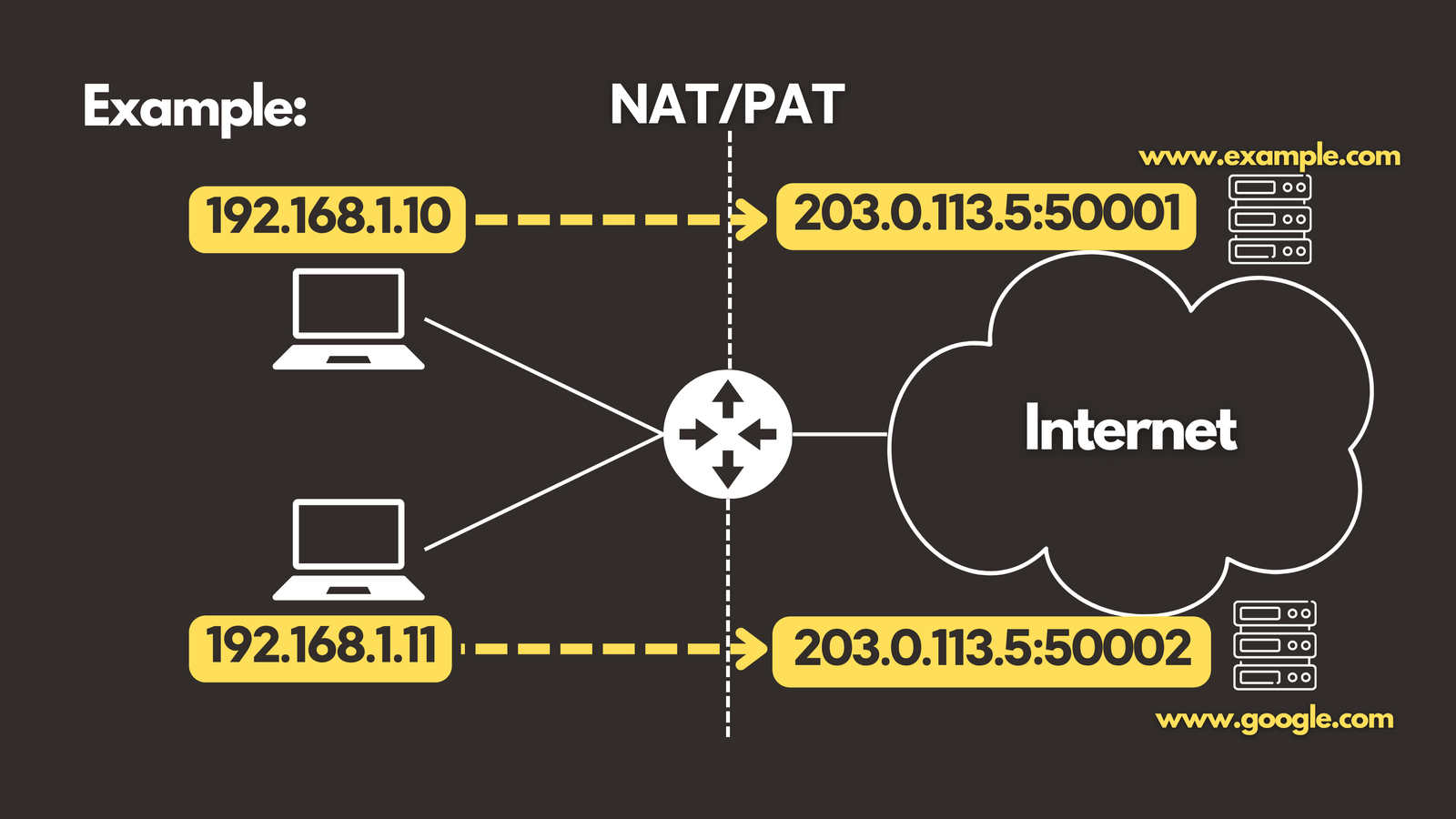
Scenario: Two devices on your internal network want to browse the web simultaneously.
- Device 1 (192.168.1.10) connects to example.com
- Router translates this to: 203.0.113.5:50001
- Device 2 (192.168.1.11) connects to google.com
- Router translates this to: 203.0.113.5:50002
- Router translates this to: 203.0.113.5:50002
Notice that both devices use the same public IP address (203.0.113.5), but different port numbers (50001 and 50002). The router maintains a translation table that tracks which internal device corresponds to which port number. When responses come back from the internet, the router uses this table to forward the data to the correct internal device.
This is precisely how hundreds of devices in your home—smartphones, laptops, tablets, smart TVs, IoT devices—can all share the single public IP address provided by your Internet Service Provider (ISP).
Virtual Private Networks (VPNs): Secure Tunnels Through the Internet
What Is a VPN?
A Virtual Private Network (VPN) creates an encrypted “tunnel” through the public internet, allowing secure transmission of sensitive data between locations or users. VPNs use encryption protocols to ensure that even if data is intercepted, it cannot be read by unauthorized parties.
Site-to-Site VPN: Connecting Office Networks
Use Case
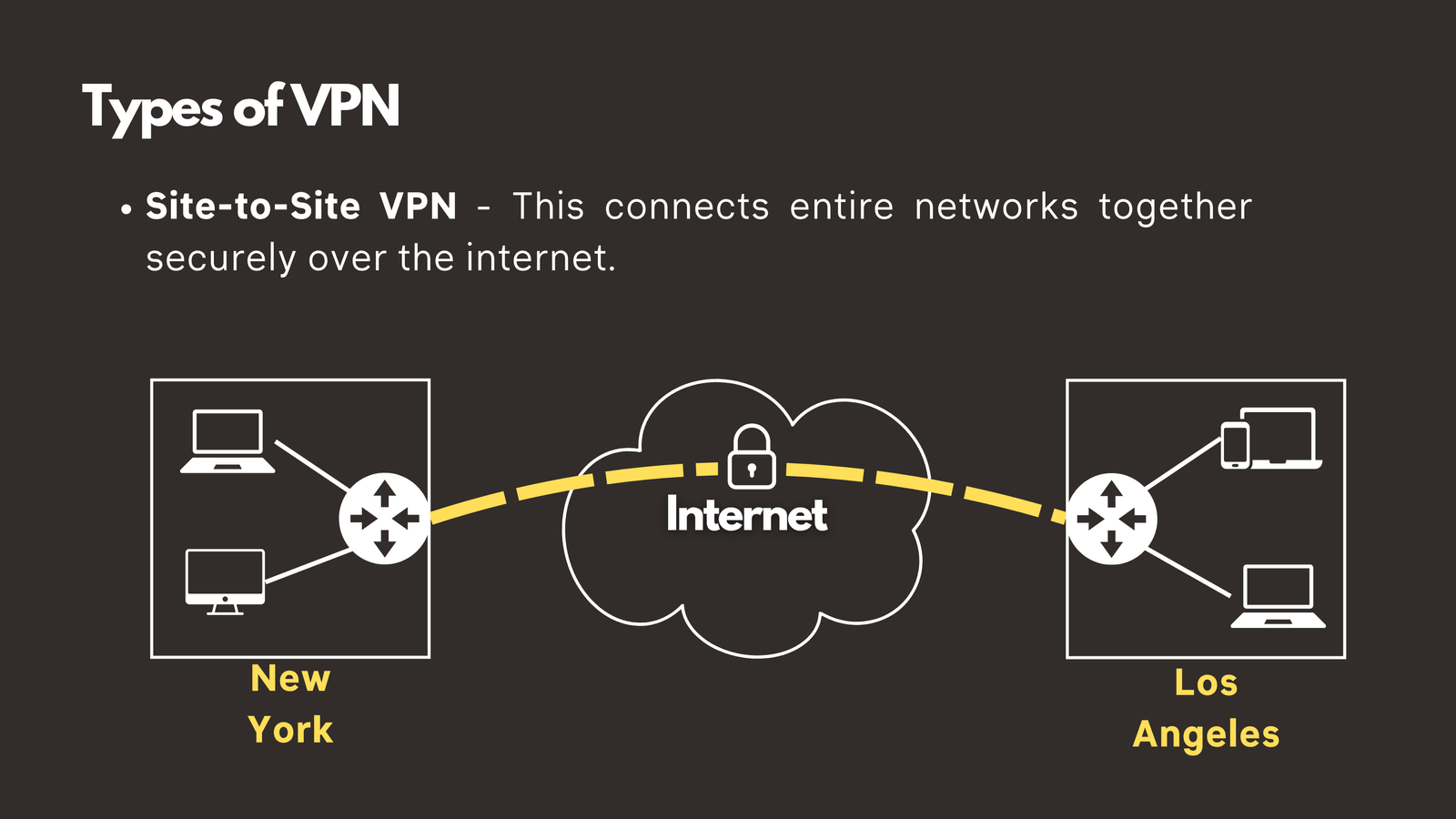
Imagine your company has grown and now operates offices in both New York and Los Angeles. Your employees in both locations need to access shared resources like file servers, databases, and internal applications. You could lease expensive dedicated WAN circuits, but there’s a more cost-effective solution: a Site-to-Site VPN.
How Site-to-Site VPN Works
VPN Gateways: Each office location has a VPN gateway device, typically a router or firewall configured to handle VPN connections.
Encrypted Tunnel: These gateways establish an encrypted tunnel through the internet, creating a secure connection between the two networks.
Transparent Access: Once configured, users in New York can access resources in Los Angeles (and vice versa) as if they were on the same local network. They don’t need to do anything special—the VPN connection is always on and works automatically in the background.
Security: All data traveling between the offices is encrypted, protecting sensitive business information from interception.
Benefits of Site-to-Site VPN
- Cost-effective: Significantly cheaper than leasing dedicated WAN circuits
- Scalable: Easy to add additional office locations
- Secure: Strong encryption protects data in transit
- Transparent: No user intervention required once configured
SSL VPN: Remote Access for Individual Users
Use Case
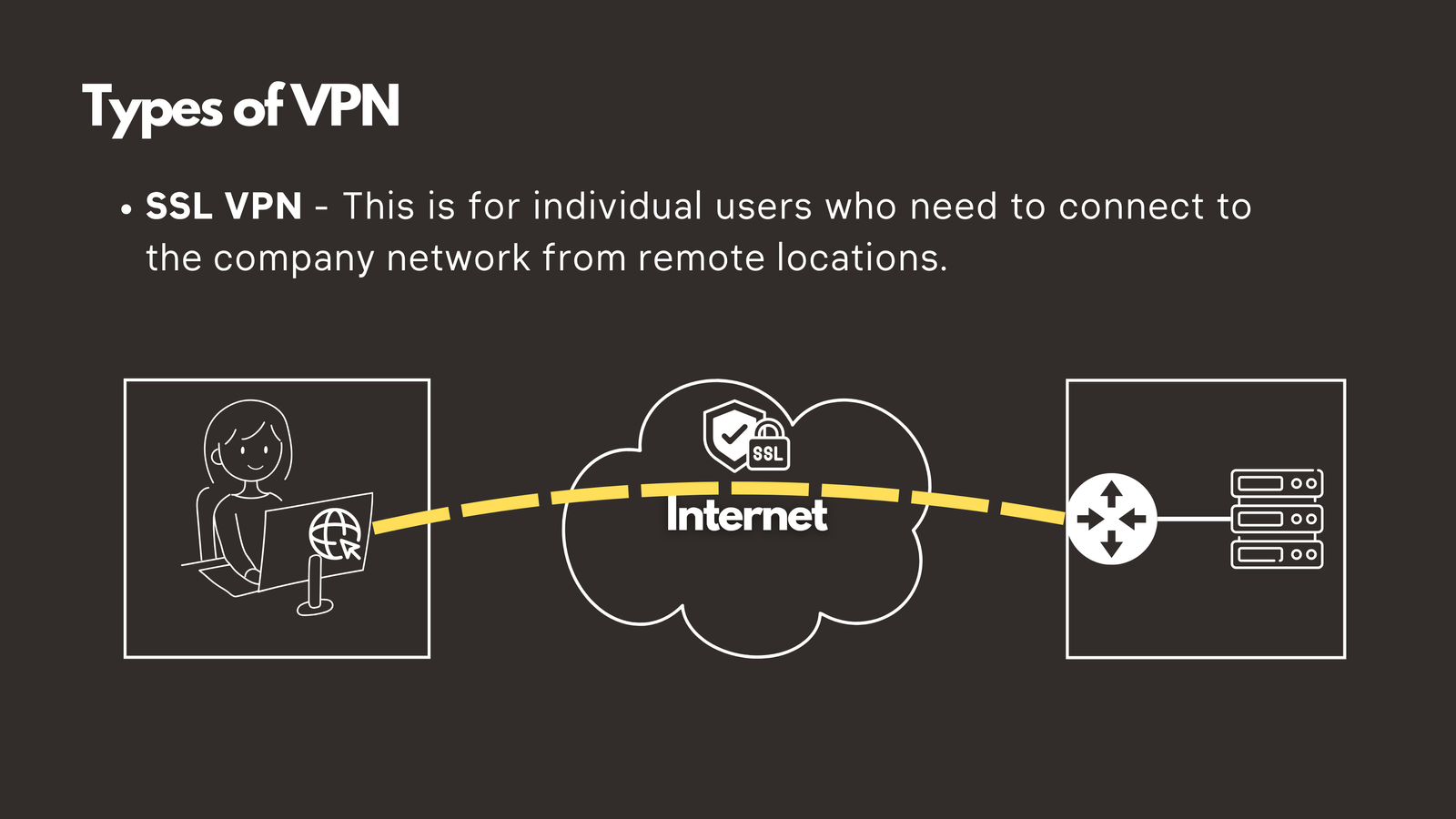
The rise of remote work has made SSL VPNs (also called Remote Access VPNs) indispensable. When you’re working from home, a coffee shop, or traveling, you need secure access to company resources without compromising security.
How SSL VPN Works
Step 1 - Connection: The remote user opens their web browser or VPN client application
Step 2 - Authentication: The user enters their username and password (often with multi-factor authentication for additional security)
Step 3 - Encrypted Tunnel: Once authenticated, an encrypted tunnel is established between the user’s device and the company network
Step 4 - Encryption Protocol: SSL (Secure Sockets Layer) or its more modern successor TLS (Transport Layer Security) provides the encryption, ensuring all data transmitted through the tunnel is protected
Step 5 - Access: The user can now securely access company files, applications, and resources as if they were physically in the office
Key Advantages of SSL VPN
- Browser-based access: Many SSL VPNs work directly through web browsers without requiring special software
- Flexibility: Users can connect from any device with internet access
- Strong security: Modern encryption protects sensitive data
- Easy deployment: Simpler to set up than traditional IPsec VPNs
Site-to-Site vs. SSL VPN: Understanding the Difference
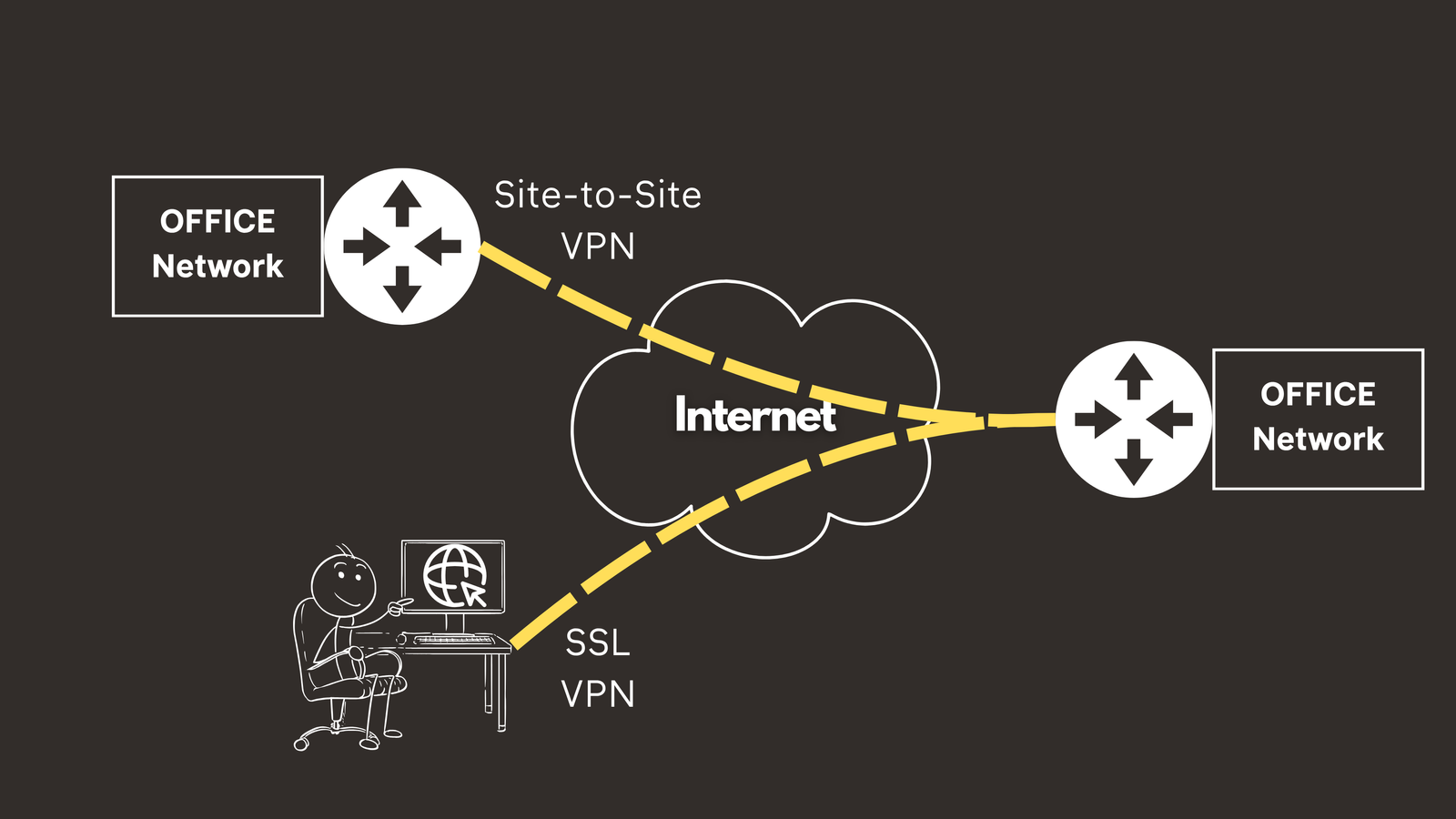
The fundamental difference between these two VPN types comes down to what they connect:
Site-to-Site VPN connects entire networks to other networks. It’s designed for permanent connections between fixed locations like branch offices.
SSL VPN connects individual users to a network. It’s designed for on-demand connections from remote workers who need temporary access to company resources.
Conclusion
Understanding ACLs, NAT/PAT, and VPNs is fundamental to modern network engineering. These technologies work together to create secure, efficient, and manageable networks:
- ACLs provide granular control over network traffic, acting as the first line of defense against unauthorized access
- NAT and PAT solve the IPv4 address shortage problem while enabling efficient internet connectivity for multiple devices
- VPNs create secure connections across the public internet, enabling both site-to-site connectivity and remote user access
Whether you’re studying for your CCNA certification, managing an enterprise network, or simply looking to deepen your understanding of network security, mastering these concepts is essential. They form the foundation upon which more advanced networking and security technologies are built.
Next Steps
Ready to continue your networking journey? In our next article, we’ll explore network monitoring and management tools including SNMP and Syslog—essential technologies for maintaining visibility into your network’s health and performance.
Stay connected and keep learning!
Have questions about ACLs, NAT, or VPNs? Check out the video on this link https://youtu.be/zVy879SfZ0I, drop a comment and let’s discuss! Don’t forget to subscribe to our channel for more networking tutorials and CCNA preparation content.