 Packetbrew
HSRP Explained: Hot Standby Routing Protocol in 5 Minutes
What is HSRP?
Every host on a network needs a default gateway — the first hop used to reach other subnets. In a basic setup, that gateway is a single router. If it goes down, every host behind it loses connectivity, even if the rest of the network is healthy.
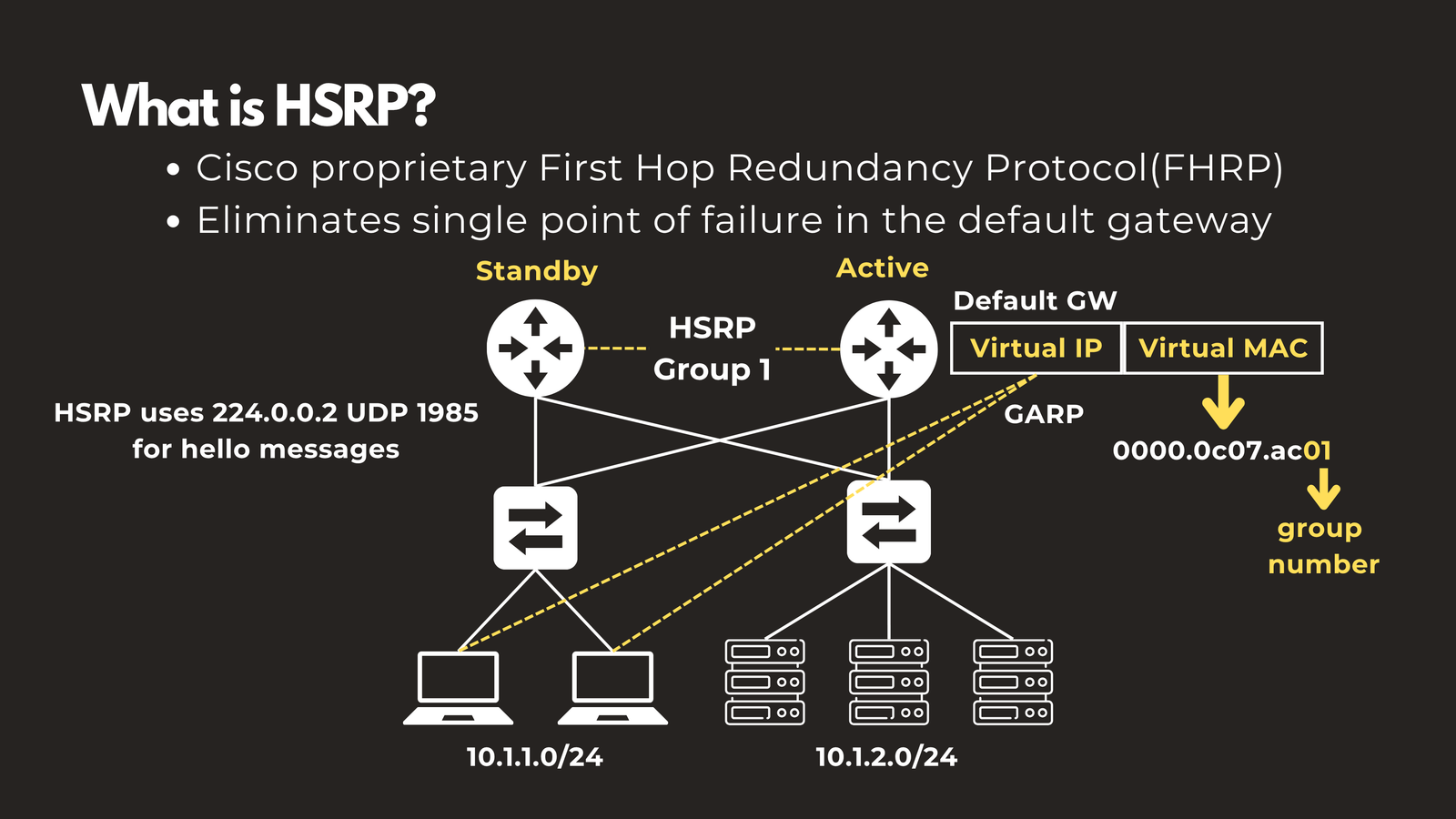
Hot Standby Routing Protocol (HSRP) is Cisco’s proprietary First Hop Redundancy Protocol (FHRP) that solves this. Instead of pointing hosts at a real router’s IP, HSRP presents a shared virtual IP address that multiple routers agree to back. If the primary router fails, a standby router silently takes ownership of that IP — no reconfiguration needed on any host.
How it works: Participating routers join the same HSRP group and elect an Active and a Standby router. The Active router forwards all traffic. The Standby monitors the Active via hello messages and takes over immediately if the Active goes silent.
The key building blocks are a virtual IP (configured as the gateway on all hosts) and a virtual MAC address in the format 0000.0c07.acXX, where XX is the HSRP group number in hex. For example, group 1 = 0000.0c07.ac01.
Routers communicate using multicast address 224.0.0.2 on UDP port 1985. All routers in the group must be Layer 2 adjacent — on the same VLAN or broadcast domain.
Election Process
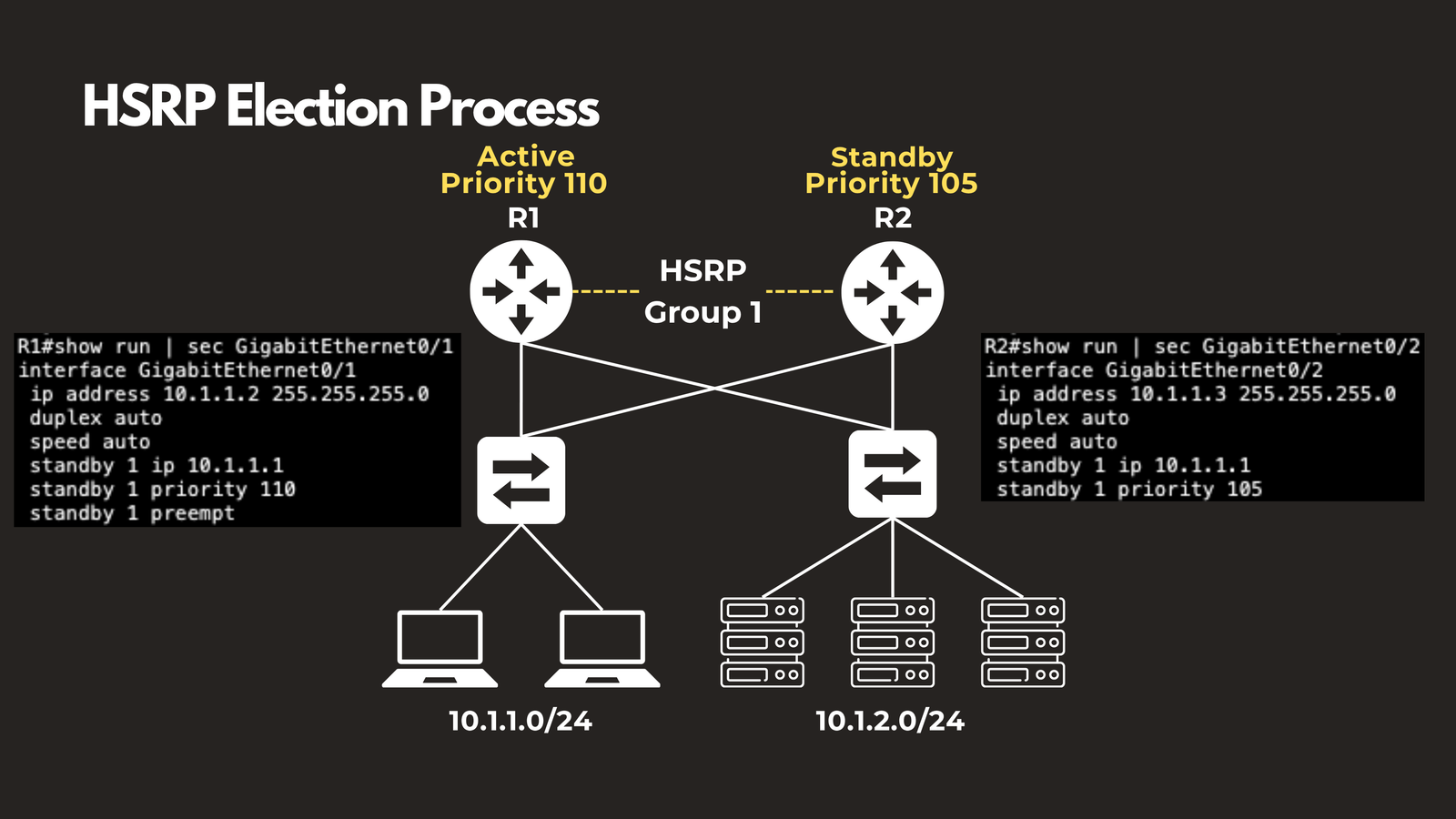
When routers in an HSRP group first come up, they negotiate who becomes Active through a simple election:
1. Priority value — the router with the highest priority wins the Active role. The default is 100 and it can be set anywhere from 1 to 255. Manually setting a higher priority on a preferred router is the standard way to control which one becomes Active.
2. Tie-breaker — if two routers have the same priority, the one with the highest real interface IP address wins.
⚠️ Watch out — Preemption is off by default
If the Active router fails and the Standby takes over, the original Active will not automatically reclaim its role when it comes back online — even if it has a higher priority. You must explicitly enable preemption with
standby X preemptto restore this behaviour.
HSRP States
Every router in an HSRP group moves through a defined state machine before settling into its final role. Understanding these states helps massively when troubleshooting.
| State | Description |
|---|---|
| Initial | The interface just came up. HSRP is not yet running on this router. |
| Learn | The router is listening for hello messages to discover the virtual IP from the Active router. |
| Listen | The router knows the virtual IP but has not yet been elected as Active or Standby. It passively monitors hellos. |
| Speak | The router actively participates in the election by sending hello messages and bidding for Active or Standby status. |
| Standby | The router lost the election. It monitors the Active by sending periodic hellos and is ready to take over instantly if the Active fails. |
| Active | This router won the election. It forwards all traffic for the virtual IP. Only one router per group can be in this state. |
Timers
| Timer | Default | Purpose |
|---|---|---|
| Hello | 3 seconds | How often the Active and Standby send hello messages |
| Hold | 10 seconds | How long before a router is declared dead if no hellos are received |
Timers can be tuned — a common production setting is 1s hello / 3s hold for faster failover — but timers must match across all routers in the group.
HSRPv1 vs HSRPv2
HSRP has two versions. HSRPv2 is the modern standard and should be preferred for all new deployments. The two versions are not compatible on the same segment.
| Feature | HSRPv1 | HSRPv2 |
|---|---|---|
| Group range | 0–255 | 0–4095 |
| Multicast address | 224.0.0.2 | 224.0.0.102 |
| IP support | IPv4 only | IPv4 and IPv6 |
| Virtual MAC(IPv4) | 0000.0c07.acXX | 0000.0c9f.fXXX |
| Virtual MAC (IPv6) | — | 0005.73a0.0XXX |
| Timer resolution | Seconds | Milliseconds |
HSRP + Spanning Tree Protocol
When multilayer switches act as gateways, HSRP and Spanning Tree Protocol (STP) both influence how traffic flows — but they operate independently. STP has no knowledge of which switch is the HSRP Active router.
This creates a classic design trap: if the STP Root Bridge for a VLAN is on a different switch than the HSRP Active router, traffic from hosts must traverse an extra hop to reach the gateway. The path becomes suboptimal without any obvious indication of a problem.
Golden rule: The STP Root Bridge should always be the HSRP Active router — ensure these roles are co-located on the same switch, per VLAN.
The fix is straightforward in design: manually set both the STP root bridge priority and the HSRP priority on the same switch for each VLAN. This keeps the forwarding path efficient and avoids unnecessary inter-switch hops.
Key Takeaways
- HSRP is Cisco’s proprietary FHRP — it presents a virtual IP and virtual MAC to hosts so gateway failover is transparent.
- Election is based on priority (default 100, range 1–255), with highest interface IP as the tie-breaker.
- Preemption is disabled by default — you must enable it if you want a recovered router to reclaim the Active role.
- Routers move through six states: Initial → Learn → Listen → Speak → Standby → Active.
- Default timers are 3s hello / 10s hold. These must match across all group members.
- HSRPv2 extends group range to 4095, supports IPv6, and offers millisecond timers.
- Always align the HSRP Active router with the STP Root Bridge on the same VLAN to avoid suboptimal paths.
Have questions about Etherchannel? Check out the video on this link https://youtu.be/DT3RUAEmrK8, drop a comment and let’s discuss!