 Packetbrew
Every Network Transmission Type Explained: Unicast, Broadcast, Multicast & Anycast
The world of IP networking is full of terminology, but when it comes to how data actually gets delivered, there are only four fundamental methods: Unicast, Broadcast, Multicast, and Anycast. Understanding the difference between them is essential for anyone working with or studying networks — from home lab enthusiasts to seasoned engineers preparing for certifications.
Let’s break each one down.
Unicast — One to One
Unicast is the most common and straightforward delivery method. It describes a one-to-one communication between a single sender and a single, specific receiver. Every transmission uses a unique source and destination IP address pair to get the packet where it needs to go.
Think of it like a direct phone call — you’re speaking to one person, and no one else hears the conversation.
Unicast is supported in both IPv4 and IPv6, and it’s the backbone of most everyday internet activity: web browsing, email, online gaming, file transfers, and video calls all use unicast under the hood.
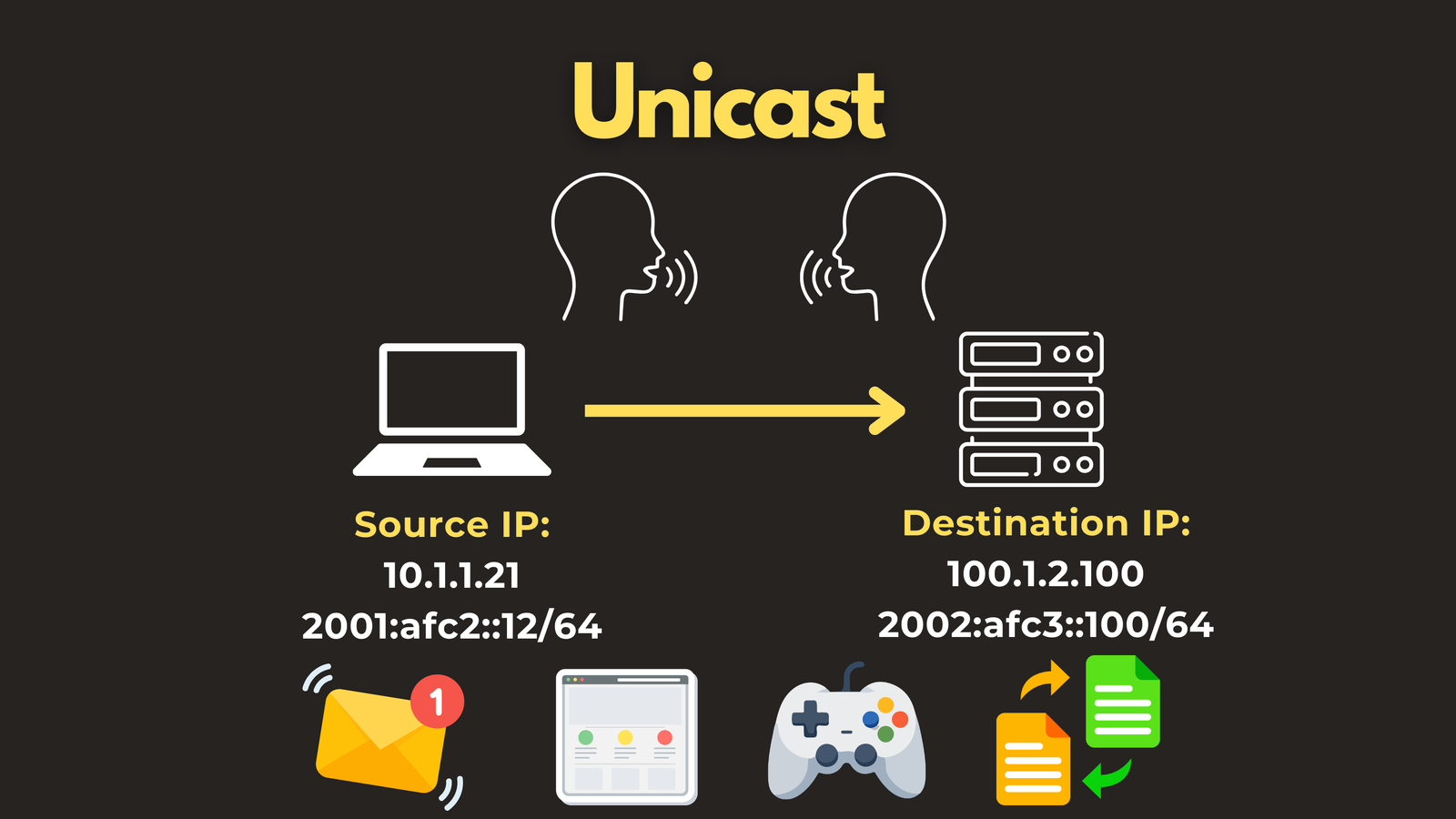
The limitation becomes clear when the same data needs to reach many receivers at once. In unicast, the sender must replicate and transmit a separate stream to each individual recipient. At scale, this becomes extremely inefficient — which is why the other delivery methods exist.
Broadcast — One to All
Broadcast takes the opposite approach: one sender, every device on a subnet as the recipient. If unicast is a phone call, broadcast is shouting across a room — everyone hears it, whether they want to or not.
There are two types of broadcast in IPv4:
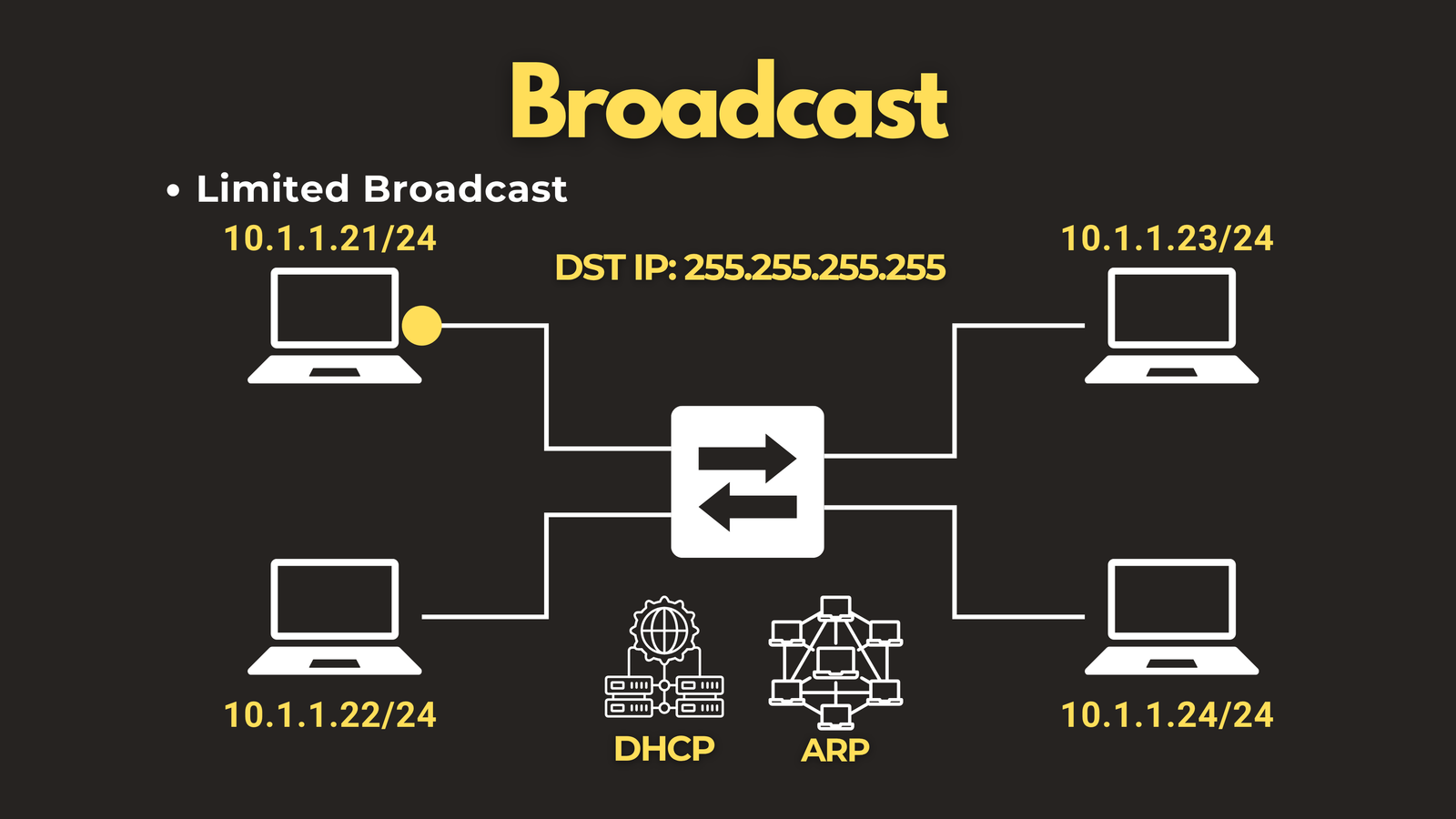
Limited broadcast uses the destination address 255.255.255.255 and is confined to the local subnet of the sender. It is never forwarded by routers. Common uses include DHCP discovery (a client asking “is there a DHCP server out there?”) and ARP requests (resolving an IP address to a MAC address).
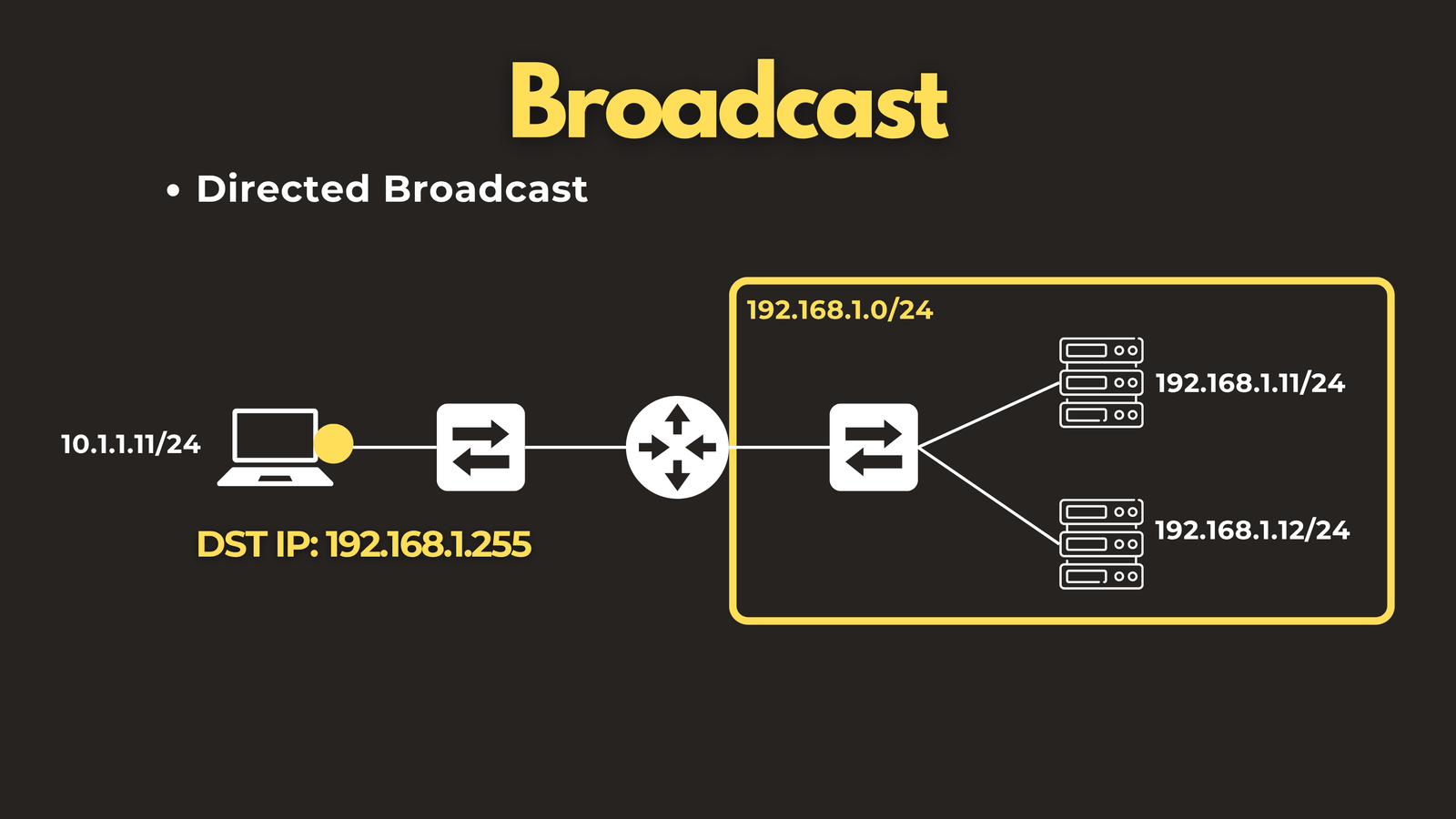
Directed broadcast uses the broadcast address of a specific subnet — for example, 192.168.1.255 for the 192.168.1.0/24 network. Unlike limited broadcast, directed broadcasts can be routed across the network to reach a remote subnet. A common use case is Wake-on-LAN, where a magic packet is sent to wake up devices on a different subnet.
Broadcast was also used by legacy routing protocols like RIPv1 to advertise routes to neighbouring routers.
The downside of broadcast is significant. Sending traffic to every device simultaneously wastes bandwidth and, in large or misconfigured networks, can trigger broadcast storms — a cascade of traffic that can bring down a network segment entirely.
It’s worth noting that broadcast only exists in IPv4. When IPv6 was designed, broadcast was deliberately removed and replaced by the more efficient multicast mechanism.
Multicast — One to Many (the Interested Few)
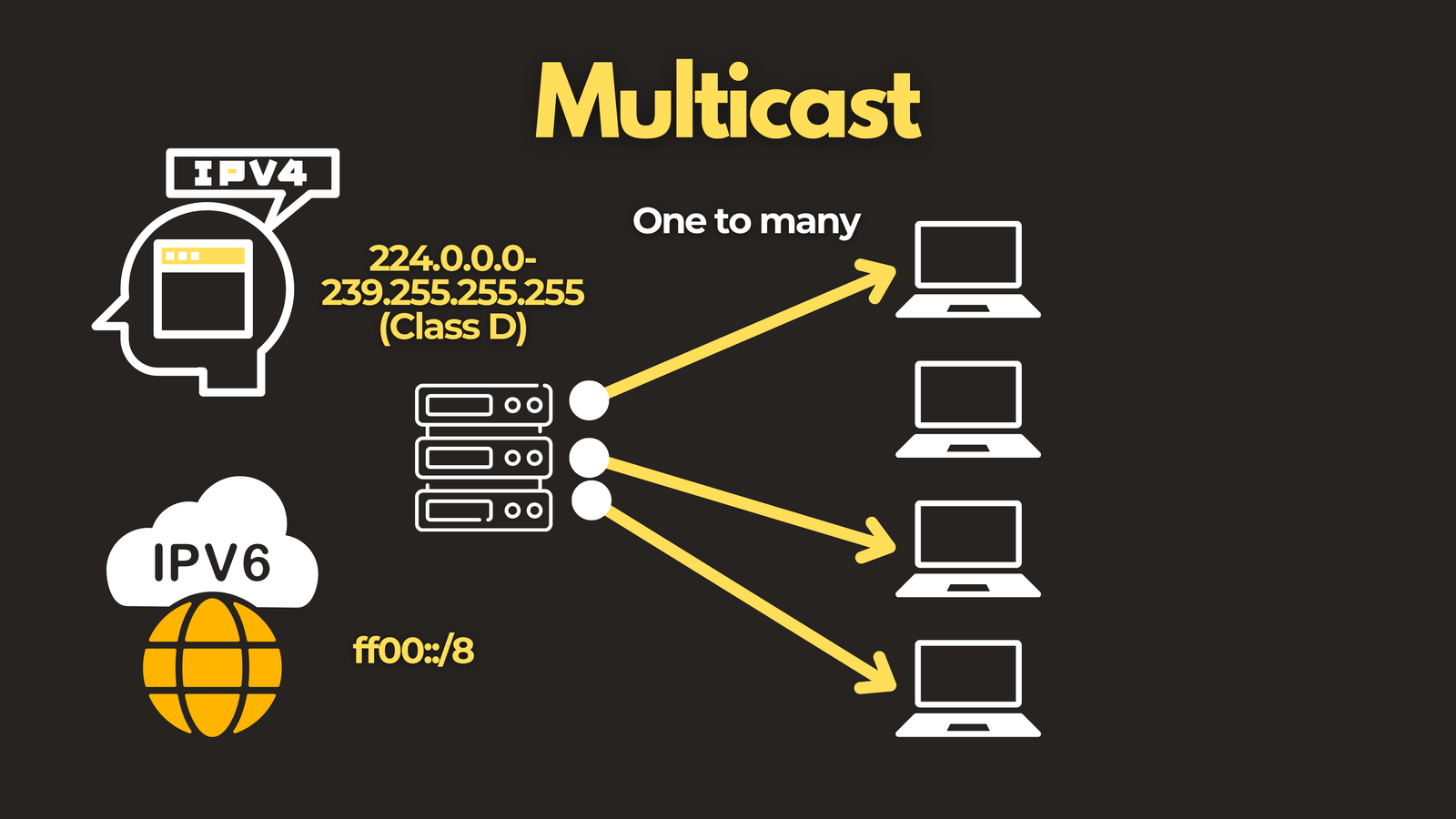
Multicast sits between unicast and broadcast. It delivers traffic from one sender to a group of receivers — but only to those who have explicitly opted in. Devices that are not interested in the traffic never receive it, which makes multicast far more bandwidth-efficient than broadcast for group communications.
Multicast is supported in both IPv4 and IPv6. IPv4 multicast addresses fall in the range 224.0.0.0 to 239.255.255.255 (Class D), while IPv6 uses addresses within the ff00::/8 prefix.
You’ll encounter multicast both in manual configurations and working silently behind the scenes — routing protocols like OSPF and EIGRP use multicast addresses to synchronize routing updates between routers.
How multicast works: the key components
Group membership with IGMP and MLD - Receivers join a multicast group by sending a membership report to their local router using IGMP (Internet Group Management Protocol) for IPv4, or MLD (Multicast Listener Discovery) for IPv6. Routers periodically query the network to check if any hosts are still interested in each group. If no one responds, the router stops forwarding that stream onto the segment.
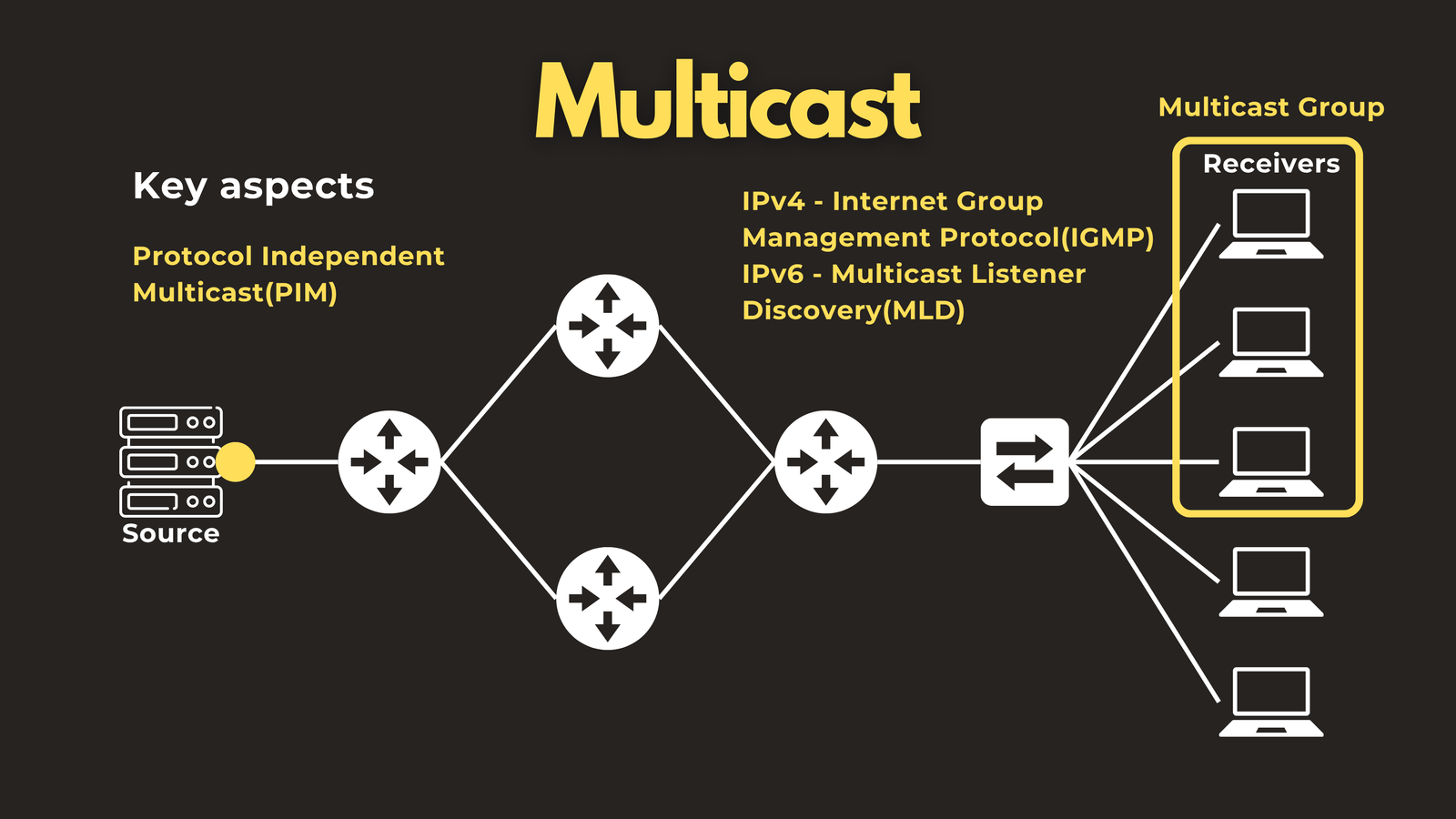
Tree building with PIM - Getting multicast traffic from the source to all receivers across a network is handled by PIM — Protocol Independent Multicast. It’s “protocol independent” because it builds the delivery tree using whatever unicast routing table is already in place, rather than maintaining its own.
PIM has two main operating modes:
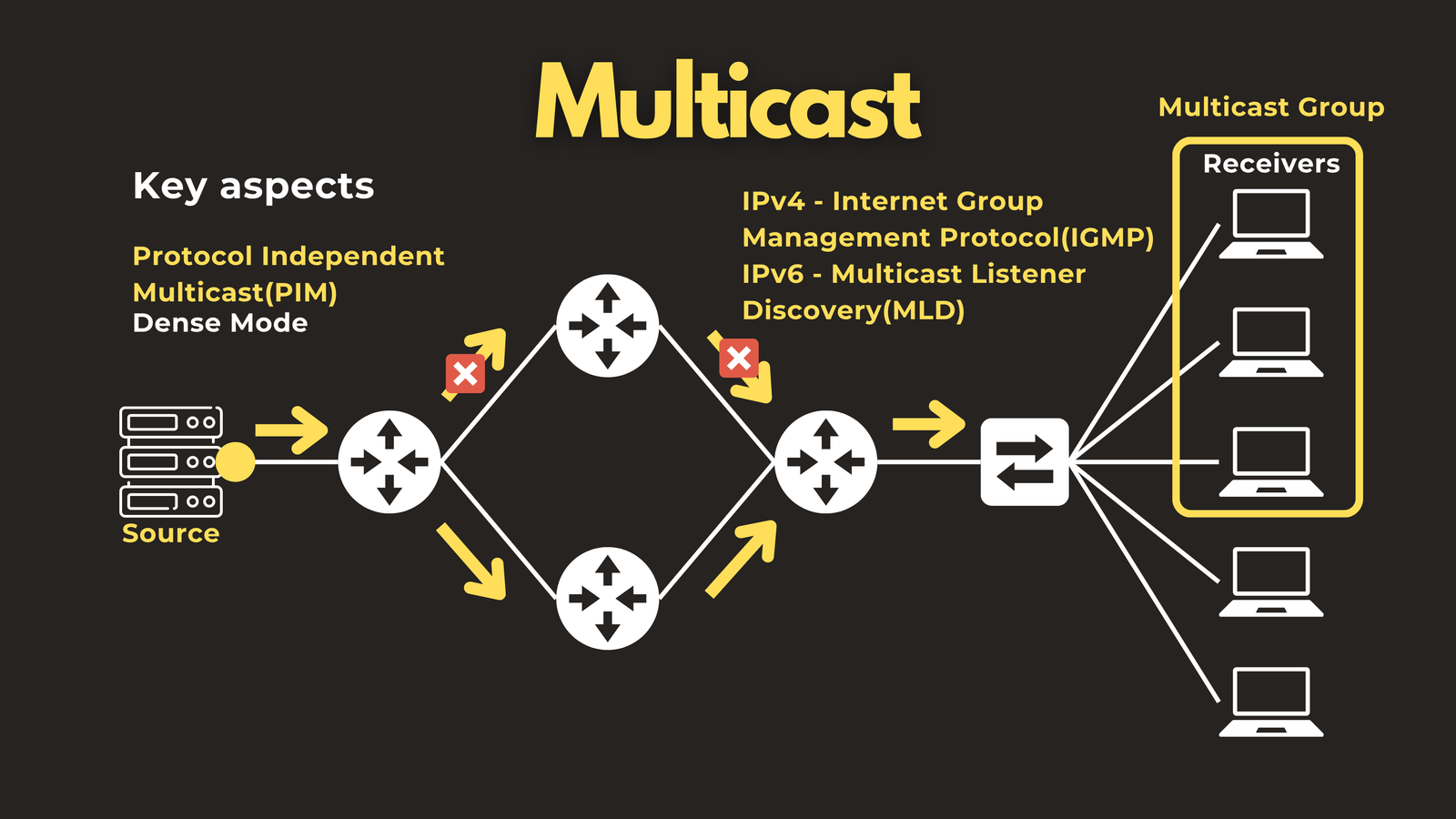
Dense Mode (PIM-DM) floods multicast traffic everywhere first, then prunes back the branches where no receivers exist. It’s simple but resource-intensive and is only suitable for small or legacy environments.
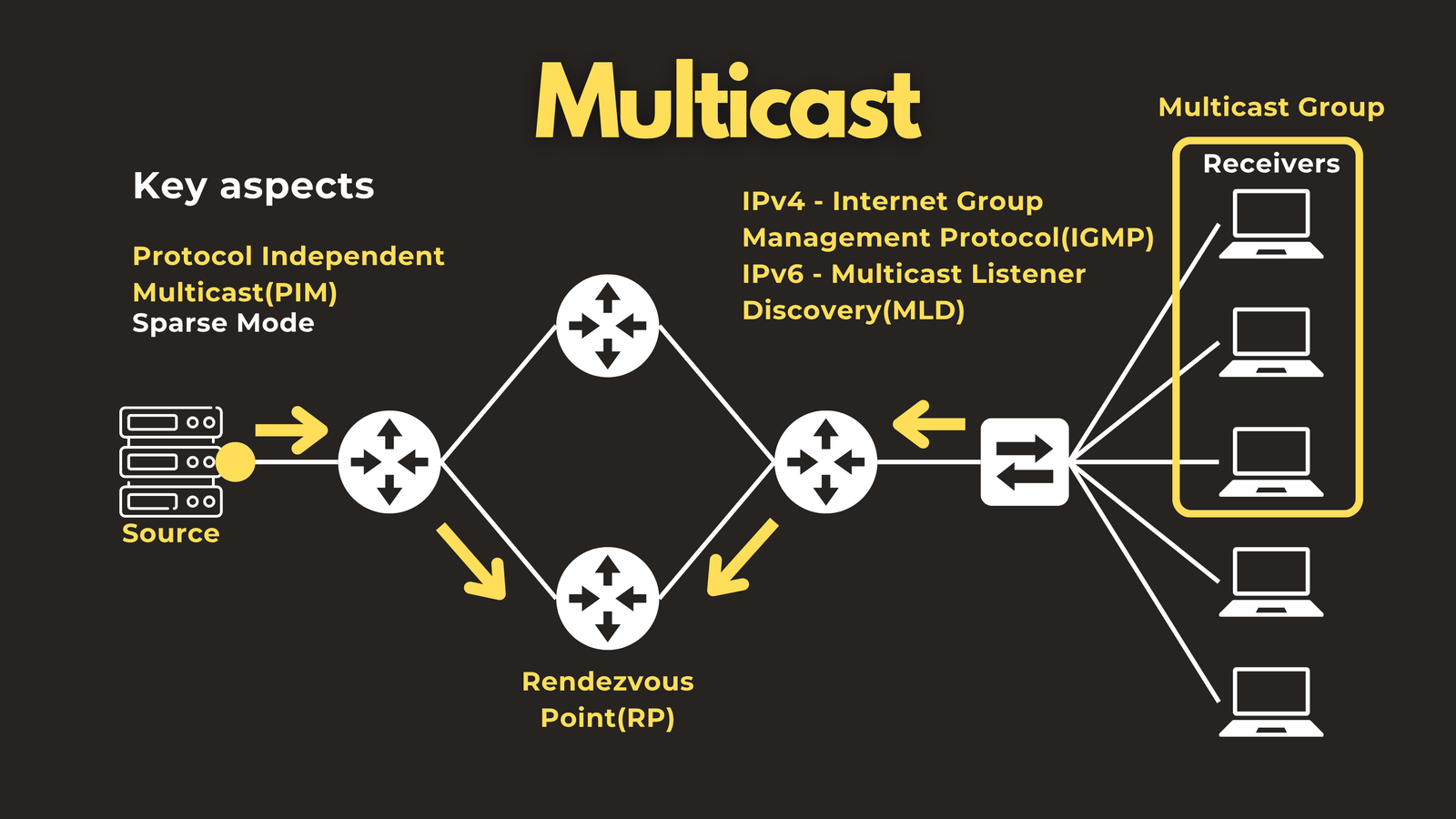
Sparse Mode (PIM-SM) is the standard in modern networks. It assumes receivers are spread out and builds the tree toward a central coordination point called the Rendezvous Point (RP). Once traffic is flowing smoothly, routers can optimise by switching to a direct Shortest Path Tree (SPT) between source and receivers, bypassing the RP entirely.
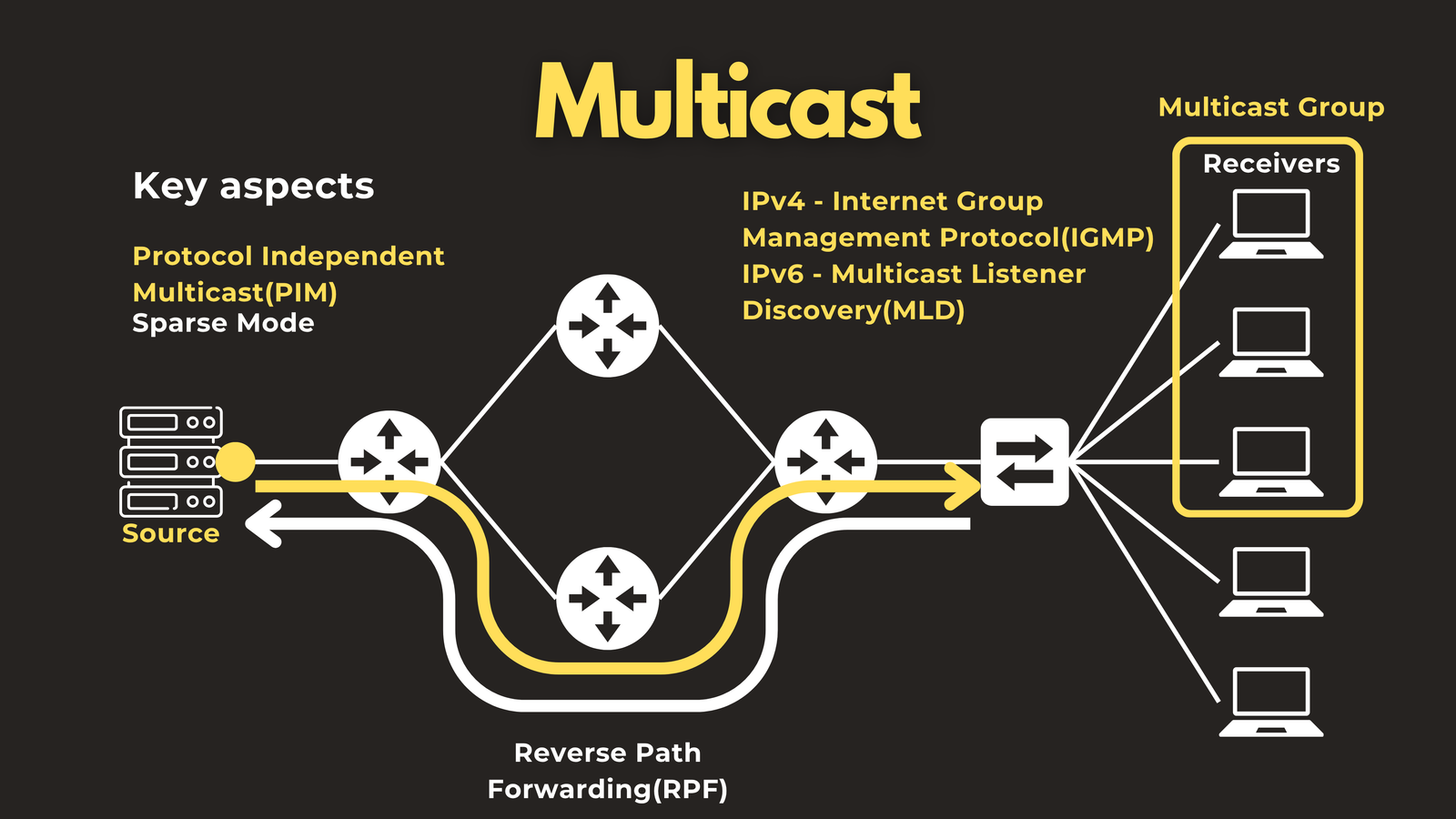
Loop prevention with Reverse Path Forwarding (RPF) Multicast prevents routing loops through a clever mechanism called Reverse Path Forwarding. When a multicast packet arrives on a router interface, the router checks: “If I were to send unicast traffic back to this source, would it leave out the interface this packet just arrived on?” If yes, the packet is forwarded. If no, it’s discarded as a potential loop. RPF reuses the existing unicast routing table — no separate loop-prevention protocol is needed.
Anycast — One to Nearest
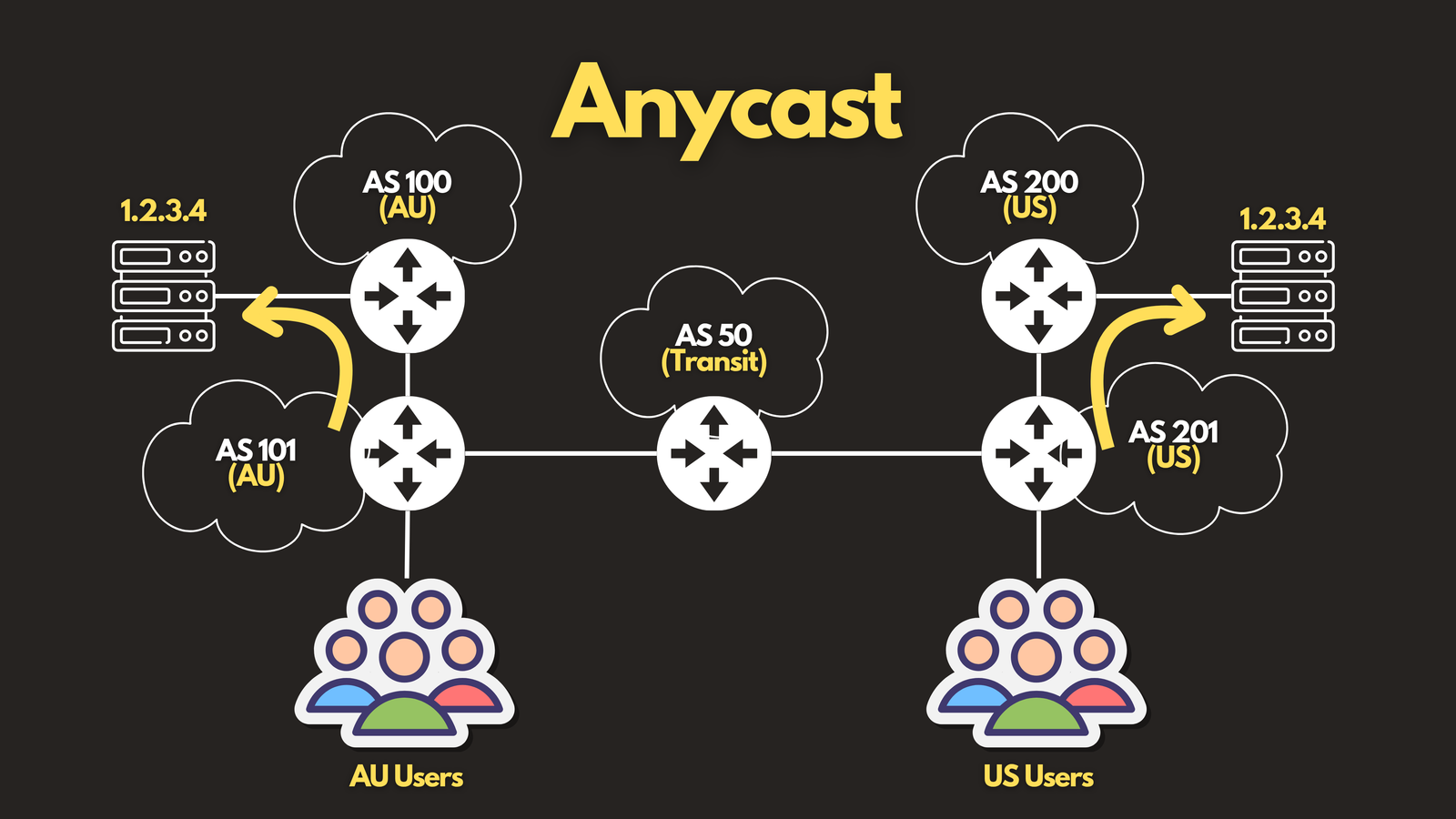
Anycast is the most elegant of the four methods. Multiple servers around the world share the same IP address, and the network automatically routes each user’s traffic to the nearest (or most optimal) instance.
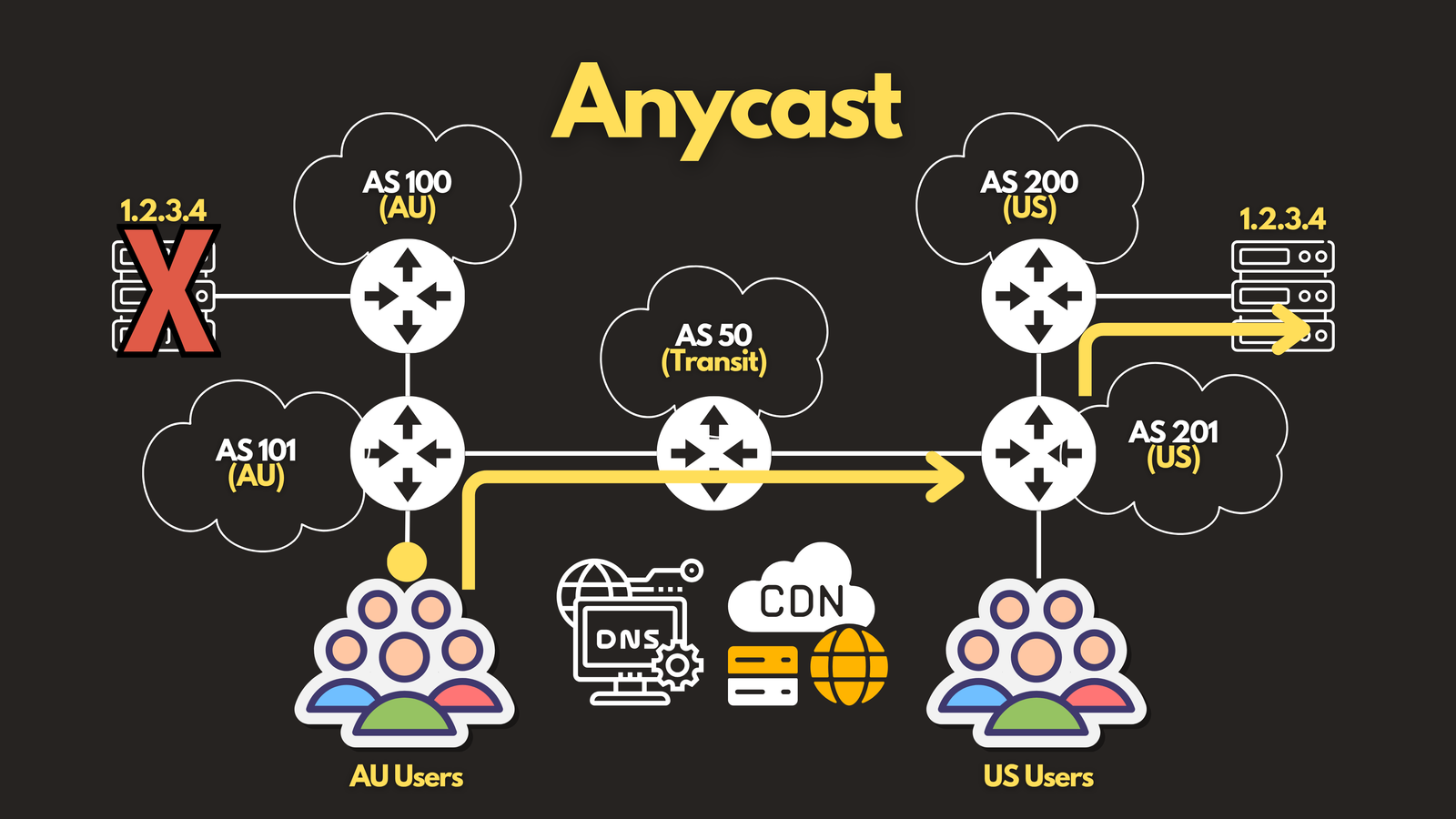
Here’s a practical example. Imagine two servers — one in the United States and one in Australia — both configured with the IP address 1.2.3.4. BGP (Border Gateway Protocol) advertises routes to this address from both locations. When a user in the US sends traffic to 1.2.3.4, BGP selects the US server because it has the shorter AS path (lower metric). A user in Australia gets routed to the Australian server for the same reason. Neither user needs to know multiple servers exist — it’s completely transparent.
If one server fails, BGP simply re-routes traffic to the remaining healthy instance. This makes anycast inherently resilient with no additional configuration required.
Anycast is widely used in:
- DNS — every major public resolver (1.1.1.1, 8.8.8.8) uses anycast to ensure fast, low-latency responses globally
- Content Delivery Networks (CDNs) — anycast routes users to the edge node closest to them
- Load Distribution — anycast distributes attack traffic across many nodes
Anycast is supported in both IPv4 and IPv6.
Summary
| Method | Delivery | Receivers | IPv6 |
|---|---|---|---|
| Unicast | One to one | Single specific host | ✅ |
| Broadcast | One to all | Every host on subnet | ❌ (removed) |
| Multicast | One to many | Subscribed group members | ✅ |
| Anycast | One to nearest | Closest matching instance | ✅ |
Each method solves a different problem. Unicast handles direct, point-to-point communication. Broadcast enables local subnet discovery. Multicast delivers efficiently to groups without flooding the entire network. And anycast uses the routing layer itself to deliver traffic to the best available destination.
Together, these four methods form the complete picture of how data moves across IP networks.
Have questions about Network Protocols? Check out the video on this link https://youtu.be/5hp8r9uZlpE, drop a comment and let’s discuss!